Horus Eye · Salesforce Org Intelligence
See the Risk.
Clear the Debt.
Protect What’s Next.
Your Salesforce org changes every day — new Flows, new fields, new integrations, new permissions, new releases, new AI agents. Horus Eye continuously analyzes how those pieces work together as one system: surfacing hidden risk, prioritizing the technical debt that actually matters, and protecting the foundation your next transformation will be built on. Evidence-backed findings, a Salesforce org health check with a memory — and the safe fixes cleared reversibly, step by approved step.
Try Horus Eye Pricing & Free Start Talk to an Architect
202 rules · 58 proven fix operations · read-only by default · start free with 250 credits — how it works, end to end →
Not a chat window on your org
Why Not Just Use Claude?If you have Claude or ChatGPT, the first fair question is: why a product? Because Horus Eye is not a UI on top of an AI model — the AI is the optional last 10%; the product is the 90% underneath. Findings come from 202 deterministic rules in code, not a conversation — the same org gives the same findings every time, with AI switched off. A scan reasons over the whole org’s metadata and dependency graph, not what fits in a context window. And a change isn’t “done” because an API said success: Horus Eye reads every change back from the org, re-checks the finding, issues a closure receipt — and can undo to the exact prior state. Use Claude for what it’s great at; Horus Eye uses Claude too. The difference is everything around it.
Three promises — and what each one actually means
The Horus Eye storySee the Risk
Find what isn’t obvious from Setup. A count says “19 Flows on Opportunity.” Horus Eye says “seven Opportunity fields have multiple independent automation writers — execution-order and regression risk.” Metadata to meaning: hidden dependencies, architecture hotspots, Flow overlap, multiple field writers, excessive access, and data nobody fully trusts.
Clear the Debt
Know what to fix — and what not to touch. Not all debt is bad, and not all of it should go. Every finding lands in a lane: safe to automate (58 fix operations, each proven live before it may run), guided remediation, architect review, a business decision only you can make — or debt you accept deliberately, priced and on the record. Prioritize, remediate safely, validate by re-scan. Judgment, not indiscriminate cleanup.
Protect What’s Next
Make today’s Salesforce safer for tomorrow’s transformation. Today’s decisions shouldn’t become tomorrow’s debt: change blast radius before every release, re-scans that turn drift into a diff instead of an incident, Agentforce readiness measured as findings, and migration risk counted before anyone commits to a date.
AI you can audit
The Trust LayerWhen Horus Eye’s AI reads your org, it reads metadata — never records. Context is allowlisted, classified and sanitized before it leaves; one gateway makes every call; an output firewall checks every answer; and every request carries an audit id and an AI Data Scope manifest you can open. AI is off by default, per org, with a written record of every change.
You don’t need a scanner to know something is wrong
The job to be doneThe job usually arrives as a question someone senior asks in a meeting, and nobody in the room can answer with evidence:
“Why does everything take three sprints?”
A rename on one Opportunity field gets scoped at three sprints — because nobody can say which Flows, Apex classes, reports and integrations touch it, so the plan has to assume all of them do. The estimate isn’t padding; it’s the price of not knowing.
“Can we just delete it?”
There are hundreds of components everyone suspects are dead — old Flows, cloned permission sets, v1/v2/FINAL copies. Nobody deletes any of them, because the last person who deleted something “unused” broke quoting for two days. So the org only ever grows.
“Who can actually see this data?”
Security or an auditor asks who can read customer records. The honest answer means untangling profiles, permission sets, sharing rules and group membership by hand — a week of work that is stale the day it’s finished.
“Are we ready for Agentforce?”
The AI conversation has started, and somebody has to say whether an agent can be trusted with this org’s data, automation and permissions. “Probably” is not an answer a CIO can take to the board.
Different questions, one root: nobody holds an evidence-backed picture of the org as a system. The people who built it left. The documentation describes 2019. Every new consultant spends their first month rediscovering it from scratch — and their findings leave with them, too.
How a healthy org becomes an unexplainable one
Why this happensNobody sets out to build technical debt; it accretes from perfectly reasonable decisions. Each admin adds automation in the technology of their era — Workflow Rules, then Process Builder, then Flow — and retirements never quite finish, so three generations run side by side on the same object. Under deadline it is always safer to clone than to modify, so the org accumulates near-copies that drift apart. Permission sets get created per request and never withdrawn, because withdrawing access is how you break someone’s Monday. Managed packages weave their namespaces into custom code. And each of these choices is invisible at the moment it is made — it only becomes visible years later, as the aggregate: an org where every change touches more than anyone expects.
That is why counting things doesn’t help. A metadata count is not an insight — the count was never the problem:
What a metadata report says
“Your org has 142 Flows and 184 Opportunity fields.”
True, and useless. Is 142 bad? Compared to what? Which of the 184 matter?
What an architect needs to hear
“Opportunity automation is distributed across 19 active components in three automation technologies. Seven fields have multiple independent writers, increasing execution-order and regression risk.”
Now there is a decision to make — and evidence to make it with.
Horus Eye is built to produce the second kind of sentence, about your org, with the evidence attached: the automation, dependencies and architecture patterns that make your Salesforce org harder to change than it needs to be — found, named, and where safe, cleared.
Looks fine. Isn’t.
The aha mindset · illustrative patterns142 active Flows. Looks fine.
Seven fields independently written by three automations. Isn’t.
Account records look complete. Fine.
Three competing customer classifications, no authoritative source. Isn’t.
Everyone’s access works. Fine.
An integration account holding Modify All Data with no MFA. Isn’t.
CPQ is working today. Fine.
182 custom dependencies outside the SBQQ namespace. Isn’t — not when the migration starts.
Illustrative product patterns, not customer statistics — each maps to real rules described on the pages below.
Where the 202 rules look
The Breakdown Is the CredibilitySecurity 59 · Automation 41 · Nintex DocGen 28 (opt-in per org) · Development 19 · Data 15 · Architecture 11 · Reporting 8 · UX 8 · Operations 5 · Scalability 4 · Integration 3 · Cost 1
Counts as of October 2026 — the rule catalog grows with the product.
What a scan produces
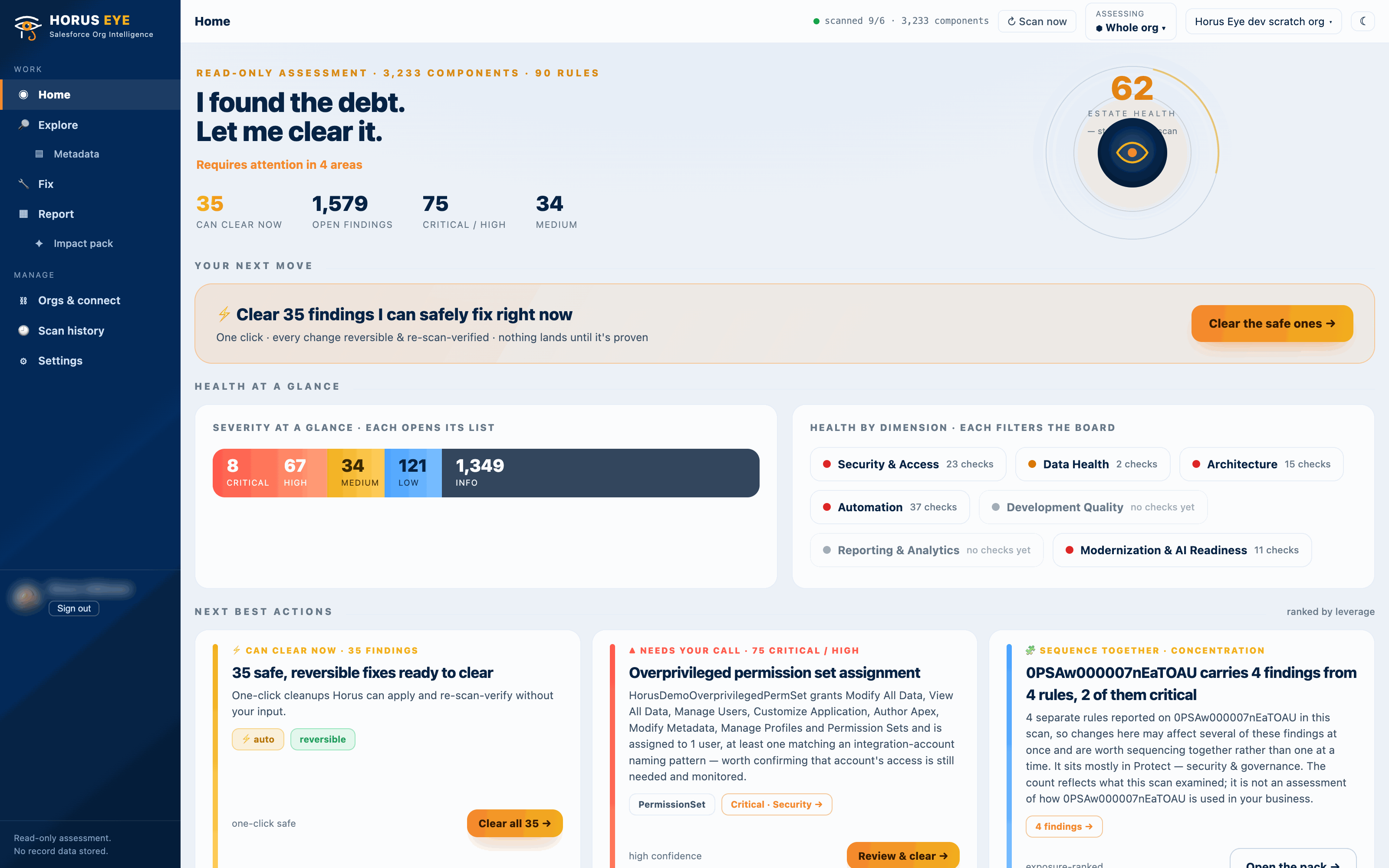
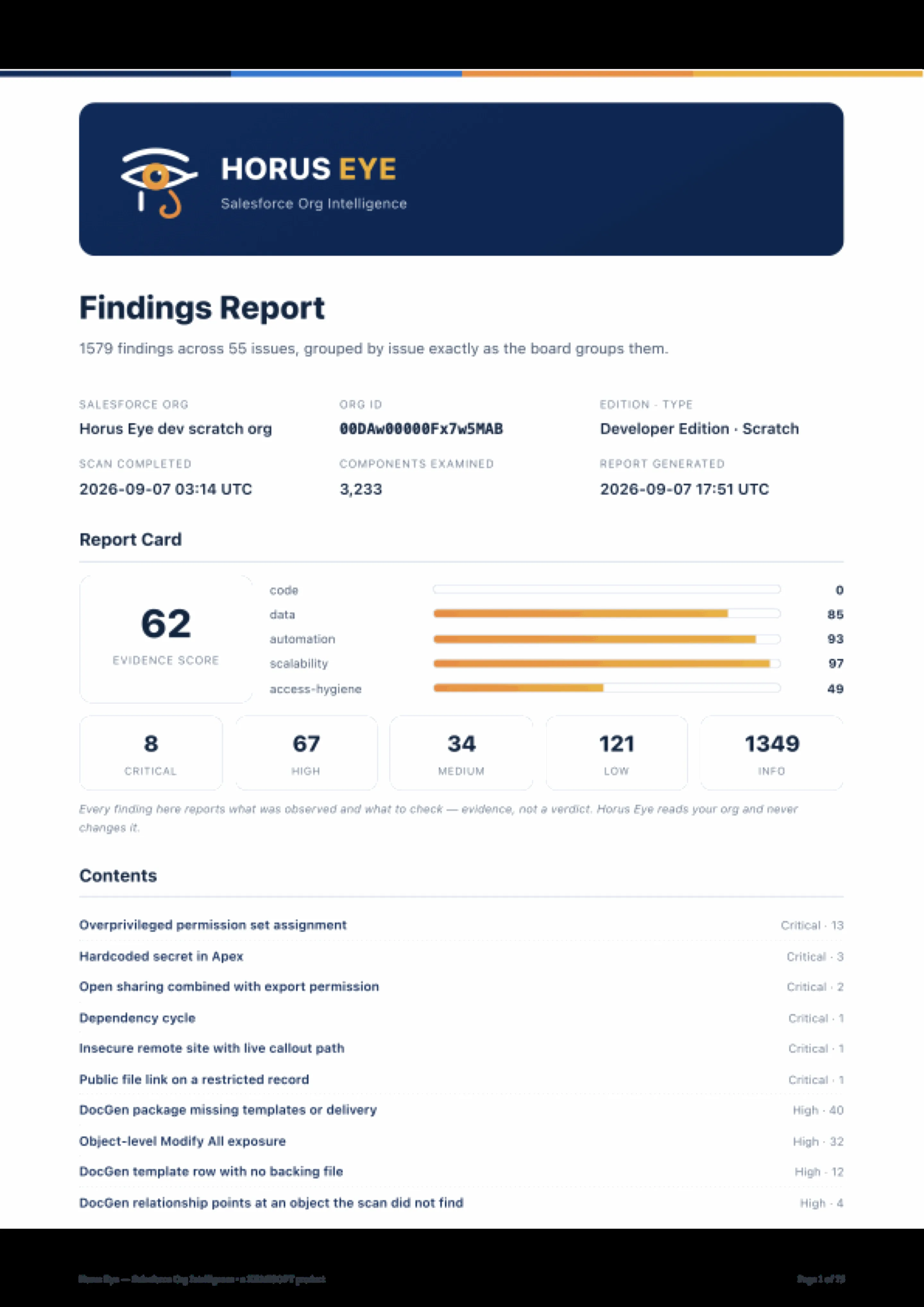
Evidence, scoredThink of it as a Salesforce org health check with an architect’s depth: Horus Eye connects read-only, inventories the org, and runs 90 detection rules across seven health dimensions. The result is an Estate Health score (0–100) — severity-weighted exposure measured against the components examined: a density of evidence, not a grade of how the org is run — with a per-dimension status and a scan-over-scan trend.
Security & Access
How widely permissions are granted, and how much of the org one account can reach. 59 rules — from excessive administrators to guest-user exposure and hardcoded secrets.
Automation
Whether automation is layered, duplicated, or pointing at things that no longer exist — circular subflows, retiring engines, multiple record-triggered Flows at the same timing.
Architecture
Coupling: object sprawl, dependency cycles, objects carrying several business domains, components pinned below the API retirement line.
Data Health
Duplicate and orphaned records and the controls meant to prevent them — honestly thin today, and said so on every report.
Development Quality
Test coverage, bulkification, code practices that decide how safely the org can change.
Modernization & AI Readiness
Distance from current platform capability — retiring tech, migration debt, the prerequisites Agentforce depends on.
The seventh dimension, Reporting & Analytics, currently reports “no checks yet” — because a dimension nothing looked at must never read as clean. That coverage honesty runs through the product: every rule reports what it examined, what was clean, and what it could not read.
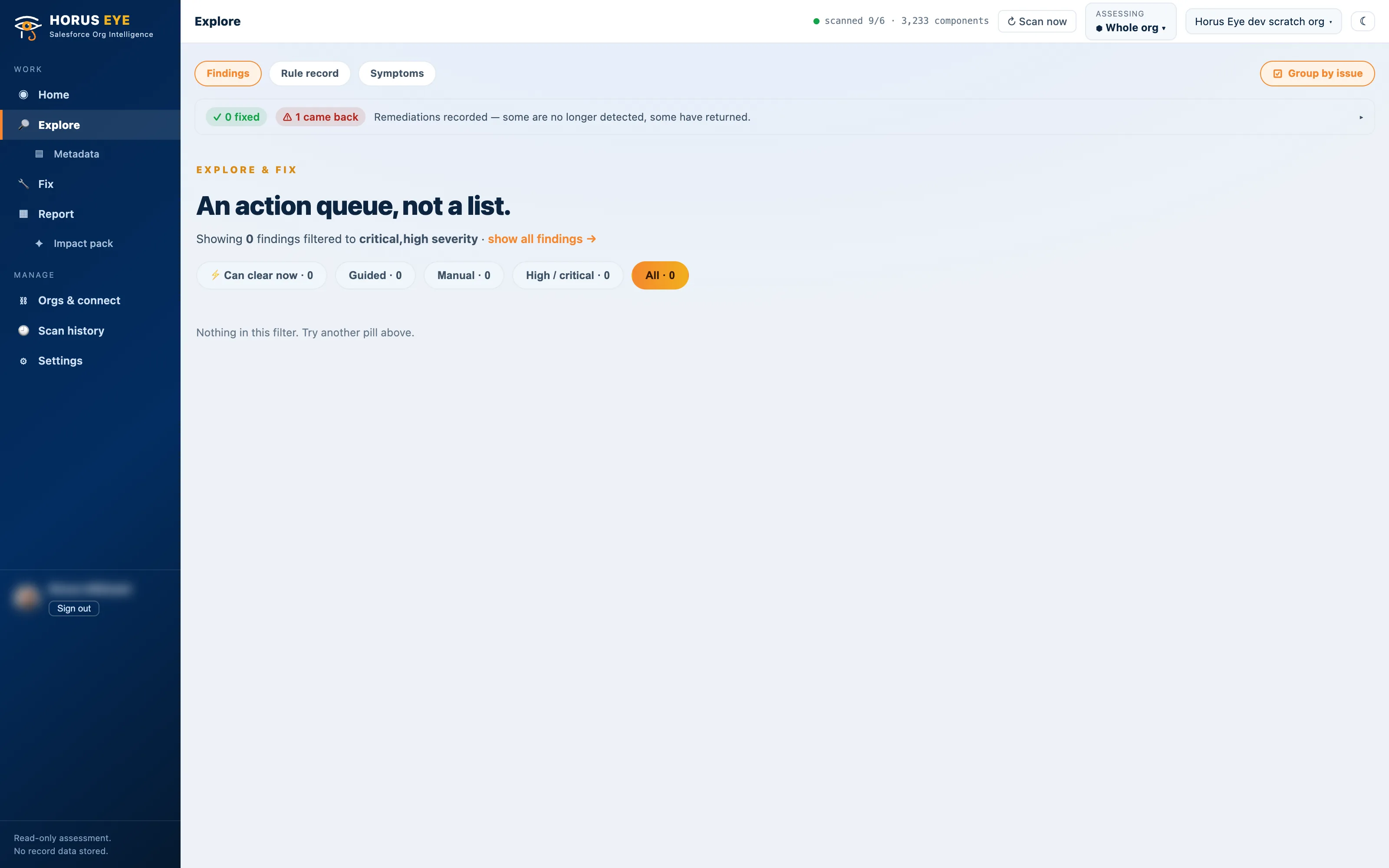
Every finding carries one or more business-impact lenses — Financial & Cost, Security & Reputation, Compliance & Governance, Scalability & Sustainability, Operational Reliability, Data Quality & Decision Integrity, Modernization & AI Readiness — so an executive can read the same queue an architect works from.
From finding to evidence — not from count to alarm
The finding drawer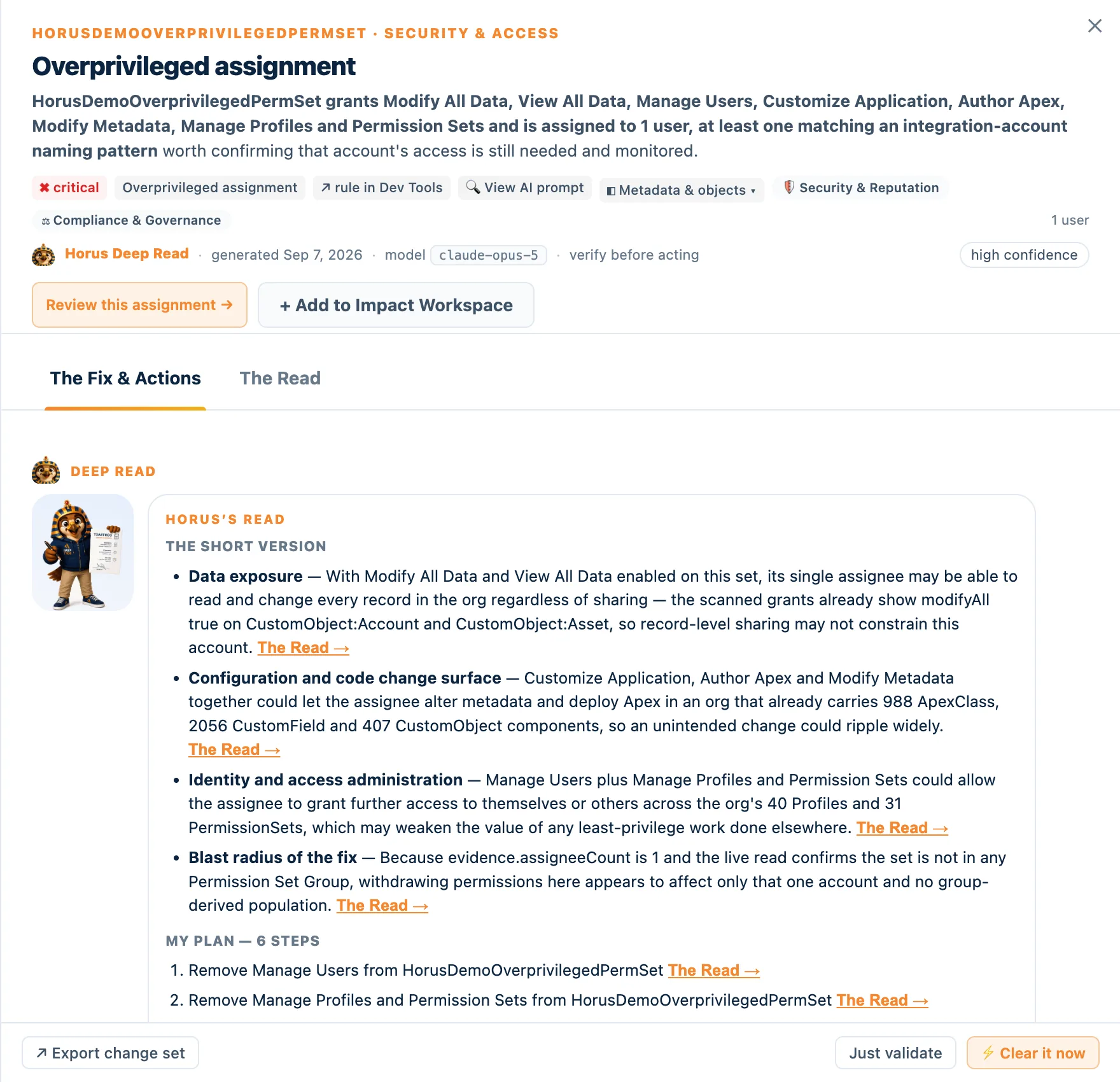
Overprivileged permission set assignment
- What Horus Eye detected
- A permission set carrying Modify All Data, View All Data, Manage Users and Author Apex appears assigned to an integration-pattern user account.
- Evidence
- Permission-set grants and assignment records read from the org’s own configuration; the permission path from set to grants to assignee is diagrammed in Deep Read.
- Why it matters
- One credential reaches effectively the whole org. If that integration is compromised or misbehaves, sharing rules offer no protection — a Security & Reputation and Compliance & Governance exposure.
- Recommendation
- Withdraw the grants the integration does not use, or split the set. Horus Eye can apply the withdrawals itself — approved step by step, validated with zero writes first, reversible.
- Confidence
- High — directly observed configuration
Findings are worded the way an architect would word them: they “appear”, they “may”. Nothing in Horus Eye is a verdict, and nothing on this page is either — the evidence is the product.
Deep Read: AI that reads metadata like an architect
Horus, the AI personaSelect any Flow, object, field, permission set, Apex class, report — most metadata types — and ask for a Deep Read. Horus investigates against the org’s own structure using read-only retrieval tools, then explains the component’s apparent business purpose, what depends on it, what it overlaps with, whether it is healthy, and what changing it could affect — with dependency, save-path, permission-path and blast-radius diagrams when the context calls for them.
Horus Eye distinguishes directly observed configuration from AI-inferred business intent and shows the evidence behind its conclusions. Every Deep Read is model-stamped, dated and confidence-rated; AI is off by default and per-org opt-in.
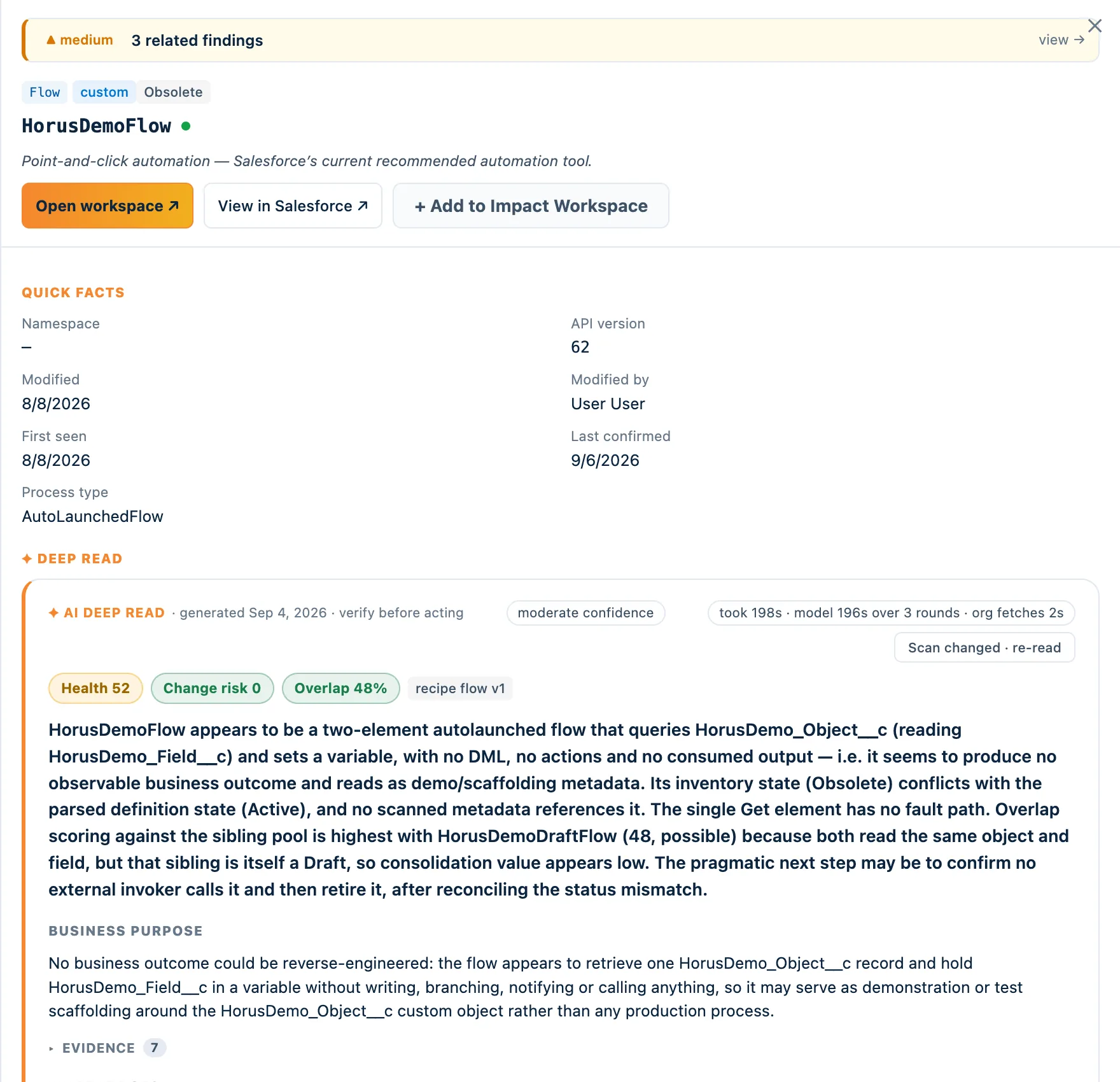
Deep Read has its own page — including exactly what is sent to the model (structured scan evidence, never record data) and the full safety model.
“I found the debt. Let me clear it.”
The part assessment tools skipAssessment tools stop at the list. Horus Eye’s Home says something different: on the demo org, 35 of 1,577 findings can be cleared now — and “Clear the safe ones” is a button, not a recommendation. Here is what pressing it actually means:
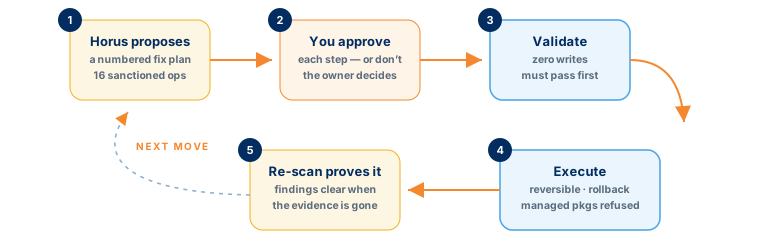
- Horus proposes a fix plan. Numbered steps, each drawn from 58 fix operations proven live before they may run — tightening access, retiring unused permission sets, cleaning inactive-user assignments, consolidating record types and validation rules, decomposing a god object into extension objects. Anything outside that vocabulary stays a guided Setup step.
- You approve each step — or don’t. The one question only the owner can answer is asked before anything else.
- Validation runs with zero writes. Only after it passes does Fix it execute.
- Everything is reversible. Rollback re-grants exactly what was removed. Managed-package components are refused outright.
- The next scan proves it. Findings clear themselves when the evidence is gone — the re-check distinguishes “resolved” from “still present, but changed”.
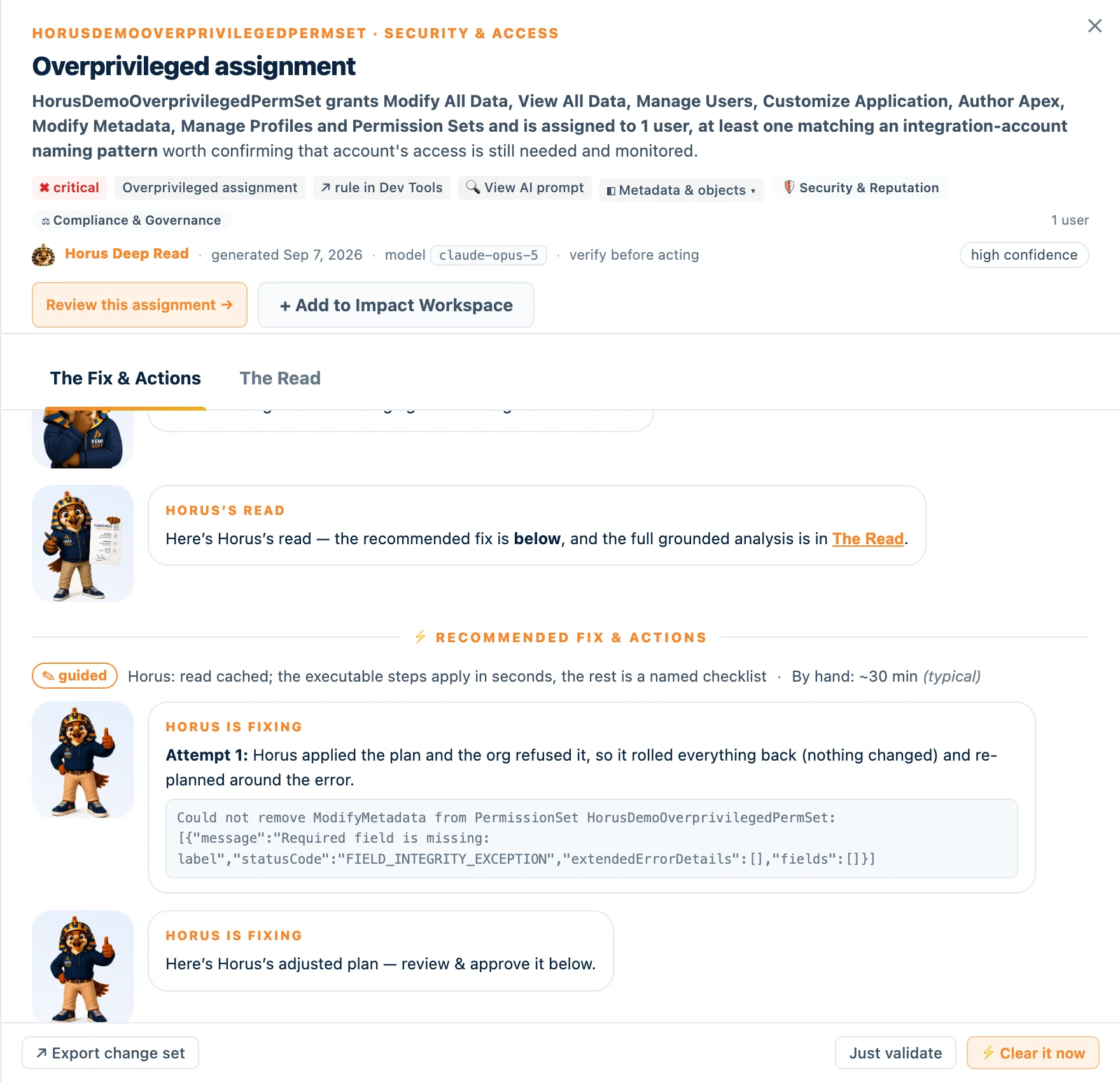
Prefer your own pipeline? Export the planned change as a Metadata API or SFDX bundle and promote it through your CI/CD instead. And what no tool should touch alone — Flow consolidation, domain redesign, the judgment calls — Kemisoft’s architects clear with you. Same promise, human half.
Connected in five minutes, read-only by default
Connection & privacyQuick Connect
Paste a session ID from a logged-in browser tab. Nothing installed, nothing stored, the session expires in about two hours. A first look in five minutes — including orgs you cannot install anything into.
OAuth (External Client App)
A one-time External Client App in your org; the refresh token is stored envelope-encrypted. This is the mode for ongoing monitoring and background rescans.
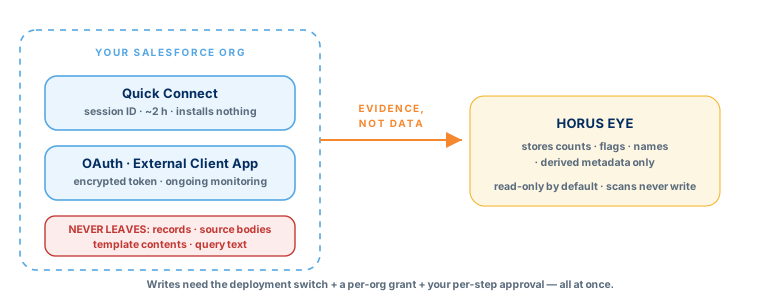
Either way, Horus Eye stores counts, flags, names and derived metadata — never raw record data, never template contents or query text. Metadata bodies (Apex or Flow source) stay out of AI reads except for code-level work you explicitly ask for — and the AI Data Scope records exactly what was sent. Scans never change the org; writes need the deployment switch, a per-org grant, and your per-step approval, all at once.
A report your stakeholders can act on
Report card & Impact pack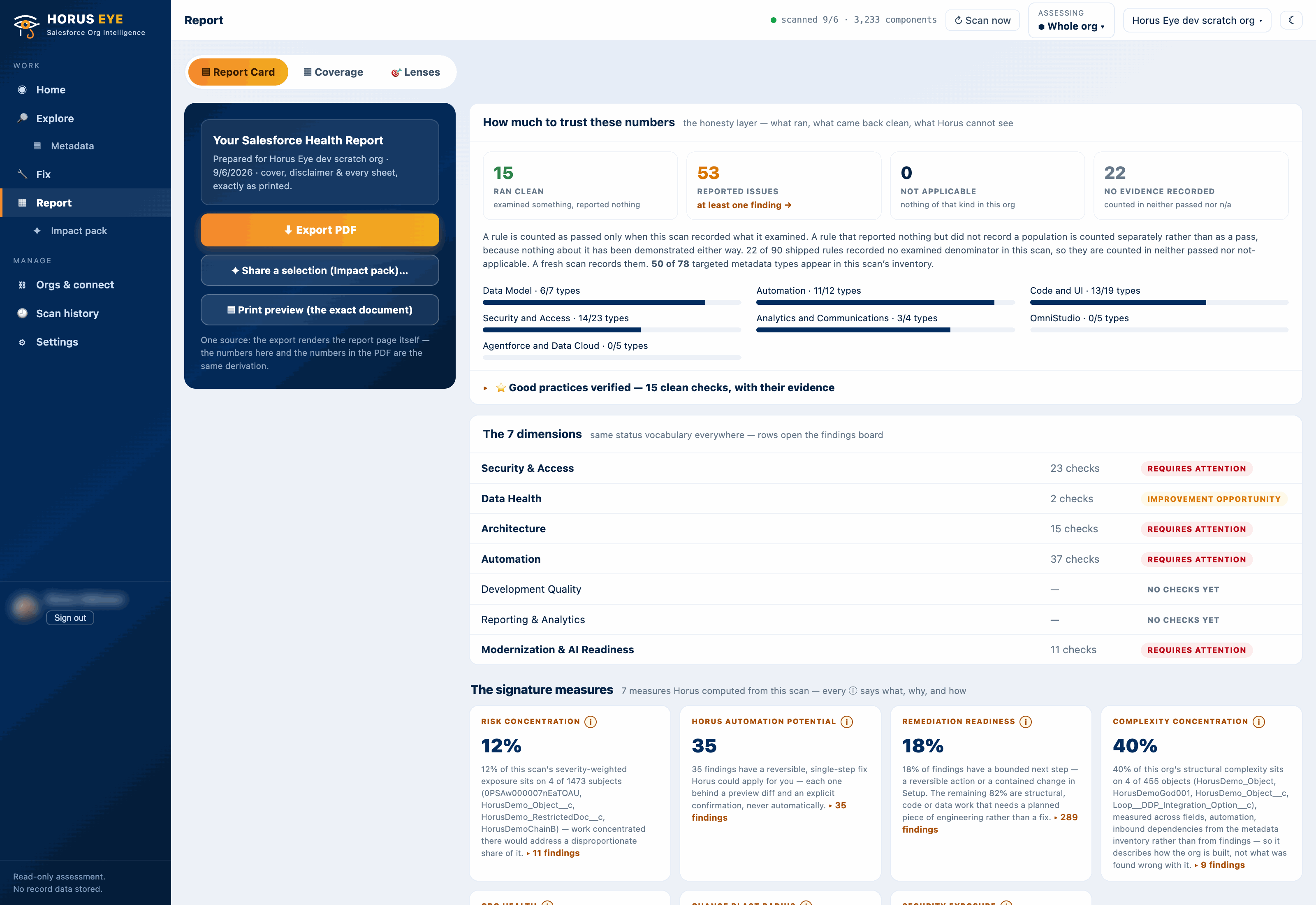
The report card ships with a coverage tab (what was examined, what could not be read), the business-impact lenses, a Now / Next / Later roadmap, and a branded PDF export. The Impact pack turns any selection of findings into a stakeholder-ready PDF or email. More on the report card.
Frequently asked questions
Straight answersDoes Horus Eye change my org?
Not unless you tell it to — three times over. Scans are read-only. Writes require the deployment switch, a per-org write grant in Settings, and your per-step approval; every executable step is validated with zero writes first, is reversible, and is verified by the next scan.
What does Horus Eye store?
Counts, flags, names and derived metadata. Never raw record data, never template contents or query text. Metadata bodies (Apex or Flow source) stay out of AI reads except for code-level work you explicitly ask for, and the AI Data Scope records exactly what was sent. Record data is never sent.
How is this different from Salesforce Optimizer or a health-check checklist?
Optimizer and checklists report configuration statistics. Horus Eye connects metadata, dependencies, business logic, permissions and automation into findings with evidence, explains the business impact through seven lenses, proposes the fix — and applies the safe subset itself, reversibly. A count tells you the org is big; a finding tells you what to do on Monday.
Why not just use Claude or ChatGPT directly?
Use them — for explaining a concept or drafting one class. What a chat can’t give you: 202 deterministic rules with published thresholds (same org, same findings, AI off), whole-org dependency reasoning, changes read back from the org and verified, an undo, and an approval record. The full comparison →
How long does a scan take?
About one to two minutes end to end on a roughly 3,200-component demo org. Bigger orgs take longer; every scan reports exactly what it examined and what it skipped.
Which orgs and editions?
Production, sandbox and scratch orgs, with the login host chosen per org (including My Domain). If a capability isn’t available in your edition, its checks report as skipped rather than silently passing.
Is Horus Eye a Salesforce org health check?
It starts as one — a read-only Salesforce org health check producing a scored, evidence-backed picture in minutes — and then goes where checklists stop: dependencies, blast radius, AI-assisted Deep Reads, and reversible fixes for the safe findings.
Do I need to install a package?
No. Quick Connect installs nothing and stores nothing; OAuth mode uses a one-time External Client App in your org.
Go deeper, problem by problem
The Horus Eye clusterTechnical Debt Assessment
Measure Salesforce technical debt with evidence: god objects, duplicate automation, retiring engines, orphaned metadata — and clear the safe subset automatically.
Architecture Assessment
Coupling, not size, makes Salesforce orgs hard to change. Horus Eye maps dependencies and blast radius — findings referenced to Salesforce Well-Architected.
Flow Analyzer & Automation Assessment
Not Flow linting — Horus Eye reads every Flow in the context of the automation around it: overlap, execution order, save-path, blast radius, consolidation plan.
Security & Permission Audit
A Salesforce security audit with evidence: 59 rules covering excessive admins, guest exposure, dormant privileged users and policy bypasses — cleared safely.
Data Quality Assessment
Duplicate rules coverage, duplicate record groups, field population evidence: what Horus Eye can prove about your Salesforce data — and where cleansing should start.
Change Impact & Dependency Analysis
See which Flows, Apex, reports and integrations depend on a component before anyone changes it — blast radius scored per change, diagrams included.
Metadata Cleanup: What Can You Safely Delete?
Unused is not the same as safe to delete. Horus Eye combines dependencies, similarity and usage evidence to rank Salesforce metadata cleanup candidates.
Agentforce Readiness Assessment
Retiring automation engines, legacy UI tech, profile-centric security, data trust: the Agentforce prerequisites Horus Eye measures in your own org, with fixes.
CPQ → Revenue Cloud Migration Assessment
Is Salesforce CPQ end of life? Not yet — but end of sale arrived March 2025. Horus Eye counts what touches SBQQ; Kemisoft scopes the Revenue Cloud move.
Nintex DocGen Health Assessment
28 DocGen checks: missing templates, broken relationships, expiring licenses, v1/v2/FINAL2 cloning — reading names and flags only, never template contents.
Deep Read AI
Select any Flow, Apex class, field or permission set. Horus Eye explains purpose, dependencies, health, overlap and change risk — evidence separated from inference.
Org Report Card & Impact Pack
Score, seven dimensions, coverage honesty, Now/Next/Later roadmap, branded PDF and Impact pack — and the scan-over-scan trend that proves what was cleared.
Trust Layer
Metadata-first AI with an audit trail: allowlisted context, a 15-pattern sanitizer, one gateway, an output firewall, and an AI Data Scope manifest on every request.
The 60-Second Teaser
Flip through the Horus Eye teaser — nine slides on seeing risk and clearing debt in your Salesforce org — then download the deck for your team.
How It Works
How Horus Eye turns Salesforce org analysis into decisions: scan, evidence, Consult Horus investigation, owner approval, supported changes, verification.
Pricing & Credits
Horus Eye pricing: start free with 250 credits for 60 days. Solo from $29/mo, Team from $149, Partner from $349. Scans are free; yearly gets 2 months free.
Why Not Just Use Claude?
Claude for Salesforce org analysis is a fair idea — Horus Eye uses Claude too. What a chat can’t give you: 202 deterministic rules, read-back verification, undo.
NPSP Migration Readiness
NPSP migration readiness assessment built on evidence: Horus Eye reads your actual NPSP org — customizations, dependencies, data debt — before you plan or budget.
Point Horus Eye at your org
A first scan takes minutes, changes nothing, and shows you the queue — including what could be cleared this week.
Try Horus Eye Let Horus Clear It All Horus Eye pagesKeep reading
Horus EyeSalesforce Health Assessment
The architect-led engagement Horus Eye feeds: findings become a remediation program with owners and sequencing.
Agentforce consulting
The prerequisites Horus Eye measures are the foundation Kemisoft’s Agentforce practice builds on.
Deep Read AI
How Horus reads metadata like an architect — and exactly what is sent to the model.