Horus Eye · Security & Access
Who can see and change what in your Salesforce org?
When security or an auditor asks that question, the honest answer usually takes a week of untangling profiles, permission sets, sharing rules and group membership — and it is stale the day it’s finished. Horus Eye runs the Salesforce security audit from the org’s own configuration in minutes — see who can access what, and why — grades each exposure by who can actually exercise it, and clears the safe ones itself.
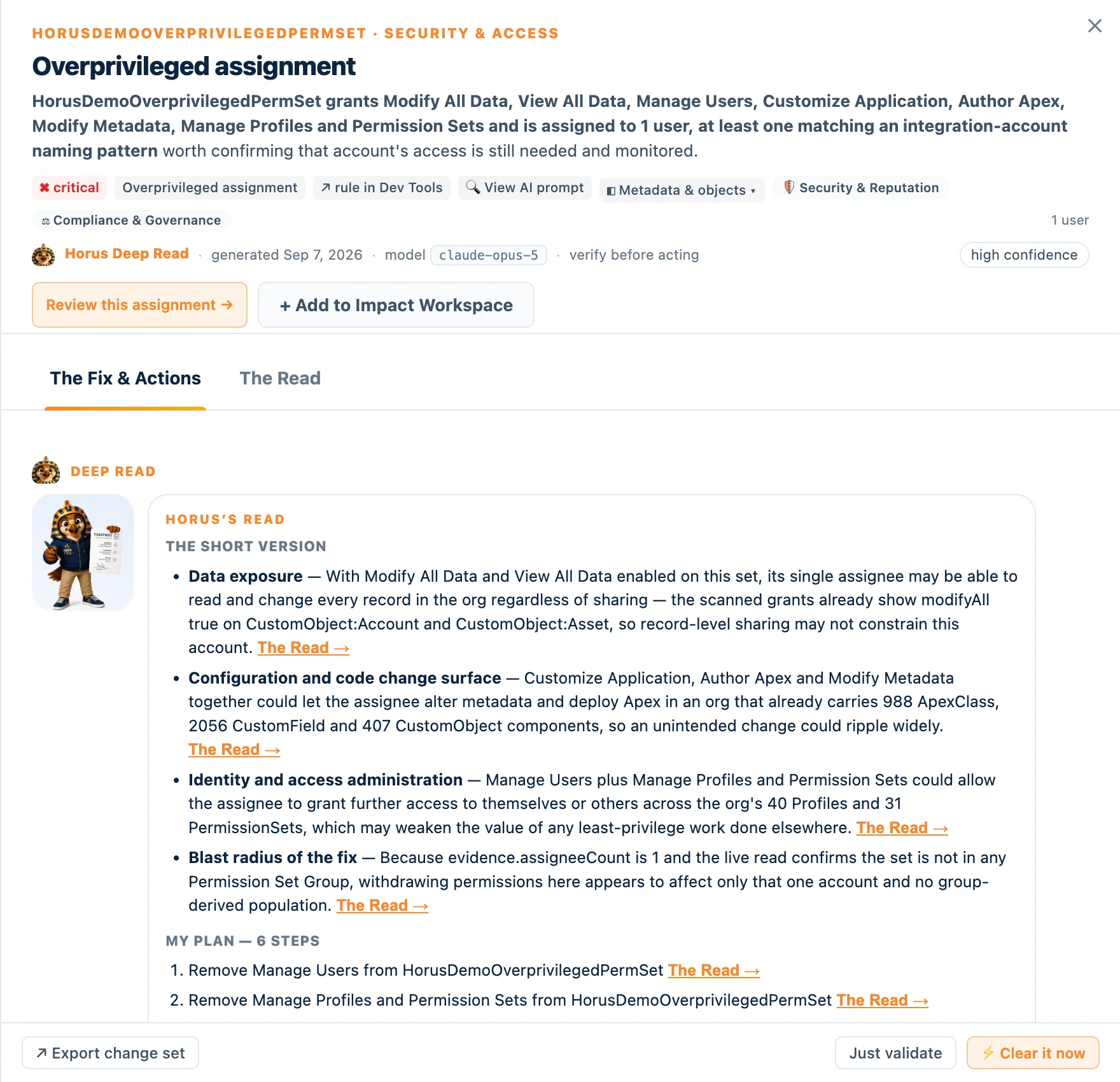
The access questions that go unanswered
SymptomsToo many people hold System Administrator, and nobody remembers why half of them need it. A permission set created for one project in 2022 still grants Modify All Data — to an account that left. The public Experience Cloud site’s guest profile can read objects nobody meant to publish. An integration user authenticates without MFA and holds Author Apex. Permission sets duplicate profile grants so thoroughly that removing either one is a gamble. And somewhere in Apex, a credential is hardcoded — it always is.
None of this shows up in a login history report. It is all sitting in configuration, readable in minutes — if something reads configuration as a connected system.
59 rules, graded by who can exercise the grant
How severity is earnedHorus Eye’s security rules refuse to grade by count alone. The same overprivileged permission set is low severity while nobody holds it, high when an ordinary user does, and critical when the assignee matches an integration-account naming pattern — because an unattended automated identity with broad access is the scenario the rule exists to surface. A few of the 26:
Excessive System Administrators
Fires above 5 active assignees on a full-admin profile — and reports the headcount while admitting what it cannot see: some orgs legitimately need several admins. Usernames are never stored, only counts. The question it asks: does each account still need full admin, or a narrower set?
Guest user exposure
One finding per guest profile, listing what an unauthenticated visitor can reach. Mechanism-graded: any write-class grant is critical (Salesforce has hard-restricted guest writes since Winter ’21 for exactly this reason); read-only grants are high, because public read is how Experience sites legitimately work — the question is whether each object belongs in the public persona.
Open sharing + export
A permission set granting Export Reports over objects whose org-wide default is already Public Read/Write: everyone can see the records, and this set can bulk-export them. Severity scales with how many objects the one set reaches — one is a deliberate combination, forty-seven is sprawl.
MFA-exempt privileged user
An admin-grade login path with no MFA gate — flat critical, and one of the auto-safe fixes: removing the exemption is a sanctioned, reversible operation Horus can apply after your approval.
Plus dormant privileged users, permission sets assigned to inactive accounts (each one a standing grant that springs back to life on reactivation), policy-bypass system permissions, profile grants duplicated by permission sets, hardcoded secrets in Apex, session-ID outbound messages, role hierarchies past platform guidance, and more. Every finding carries its Salesforce documentation references.
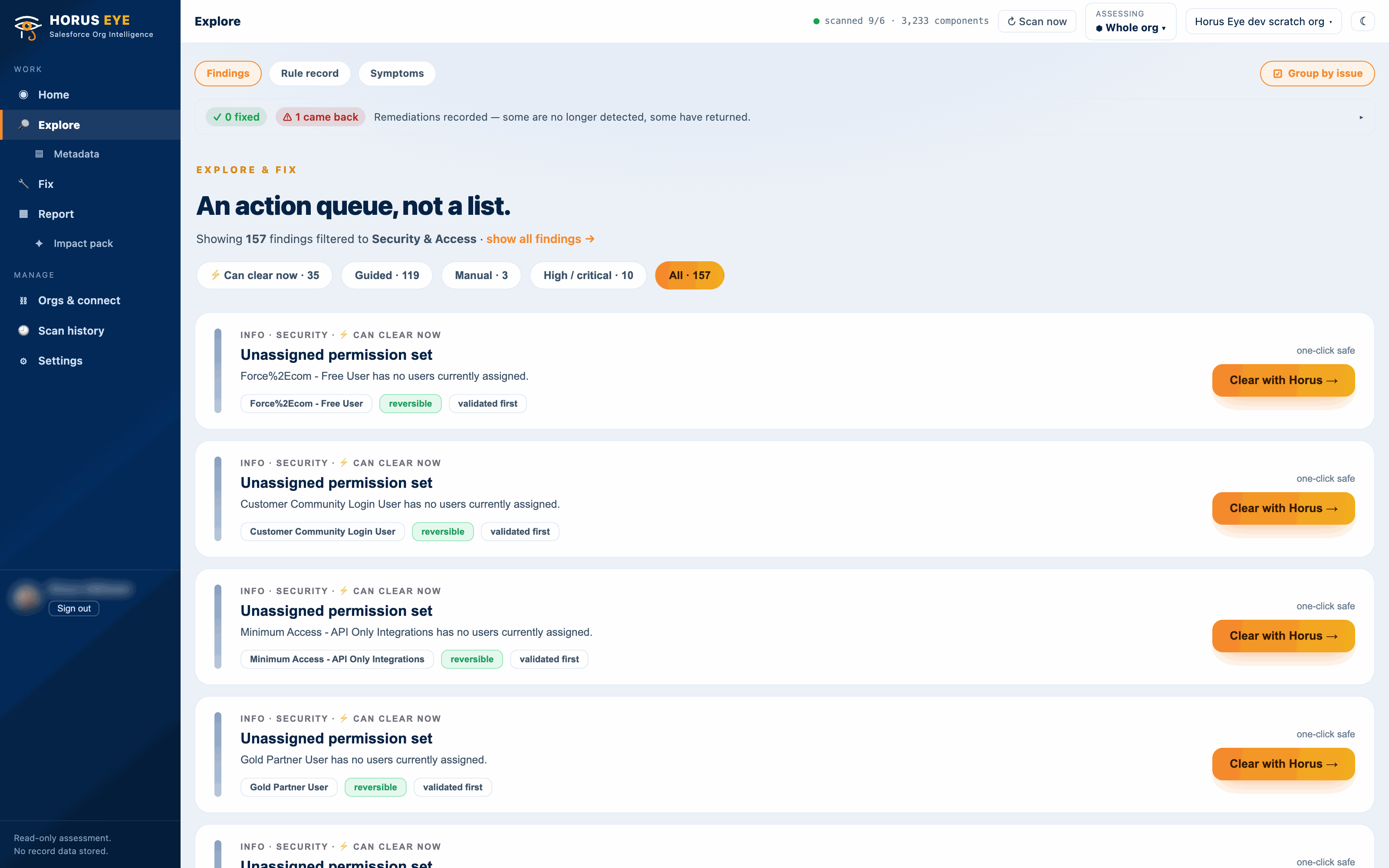
The permission path, drawn
Deep ReadFor any permission set or profile, Deep Read draws the path: grantor → grants → objects and system permissions → assignees. It is the diagram every access review meeting has been trying to whiteboard from memory.
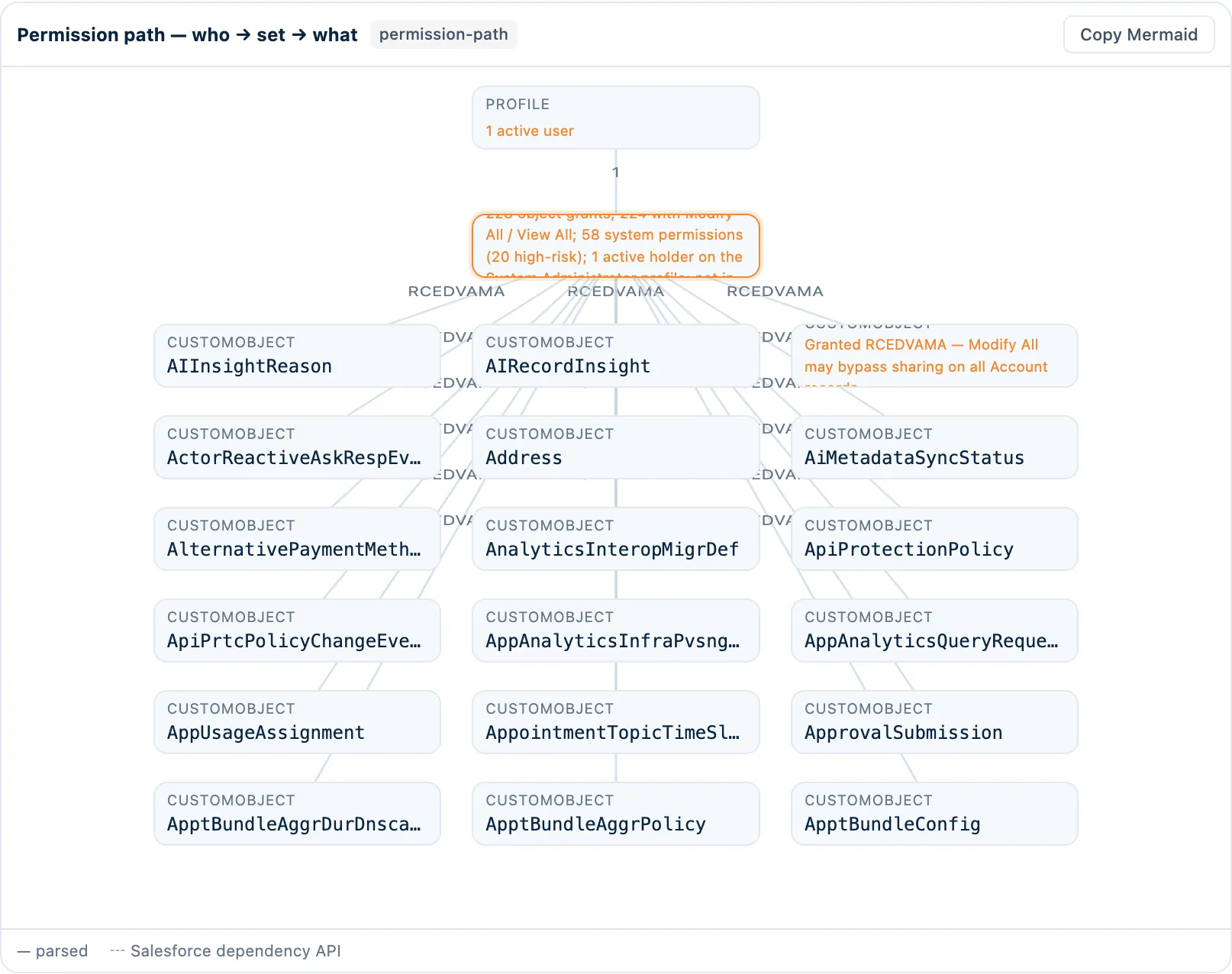
Overprivileged permission set assignment
- What Horus Eye detected
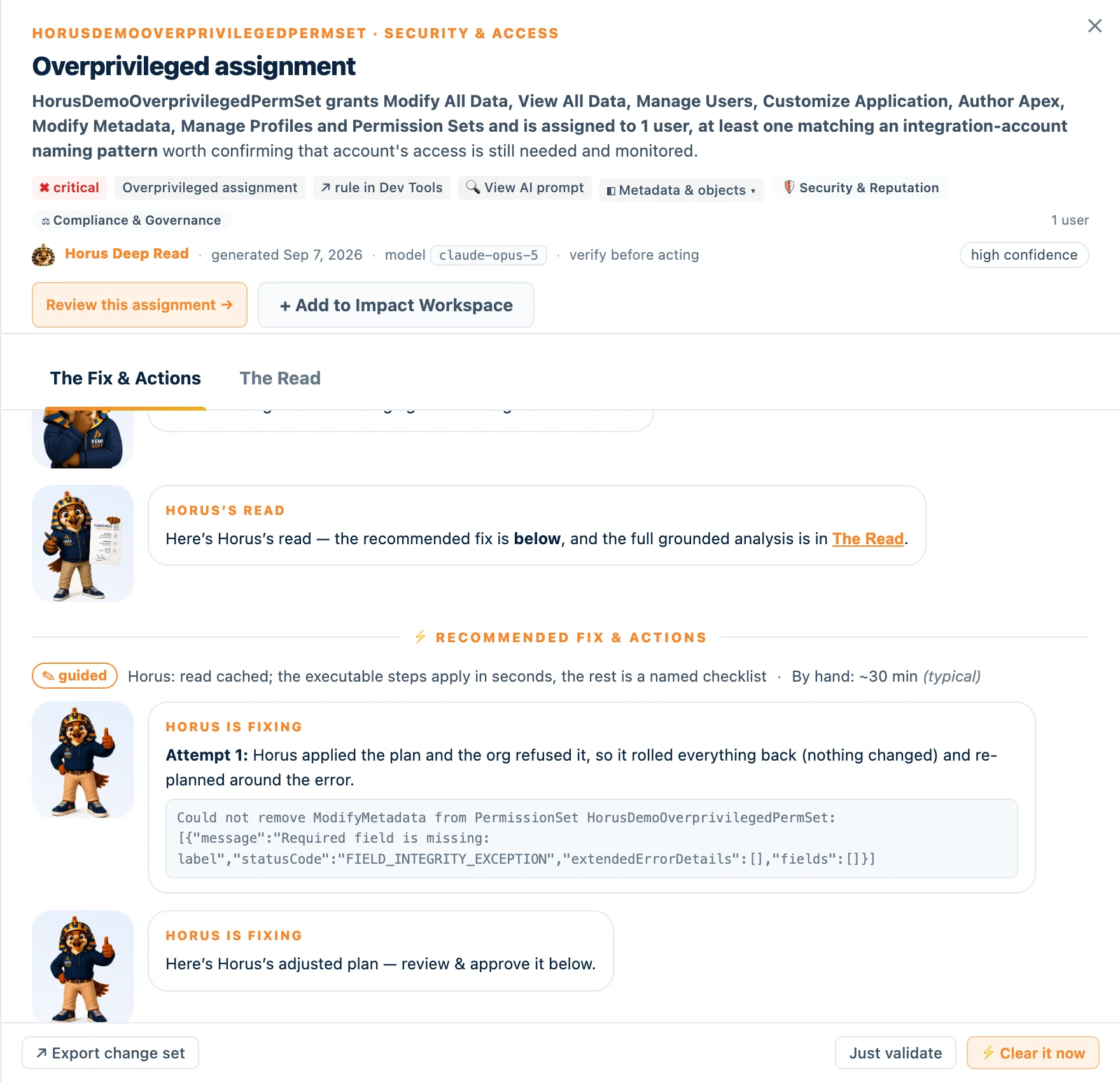
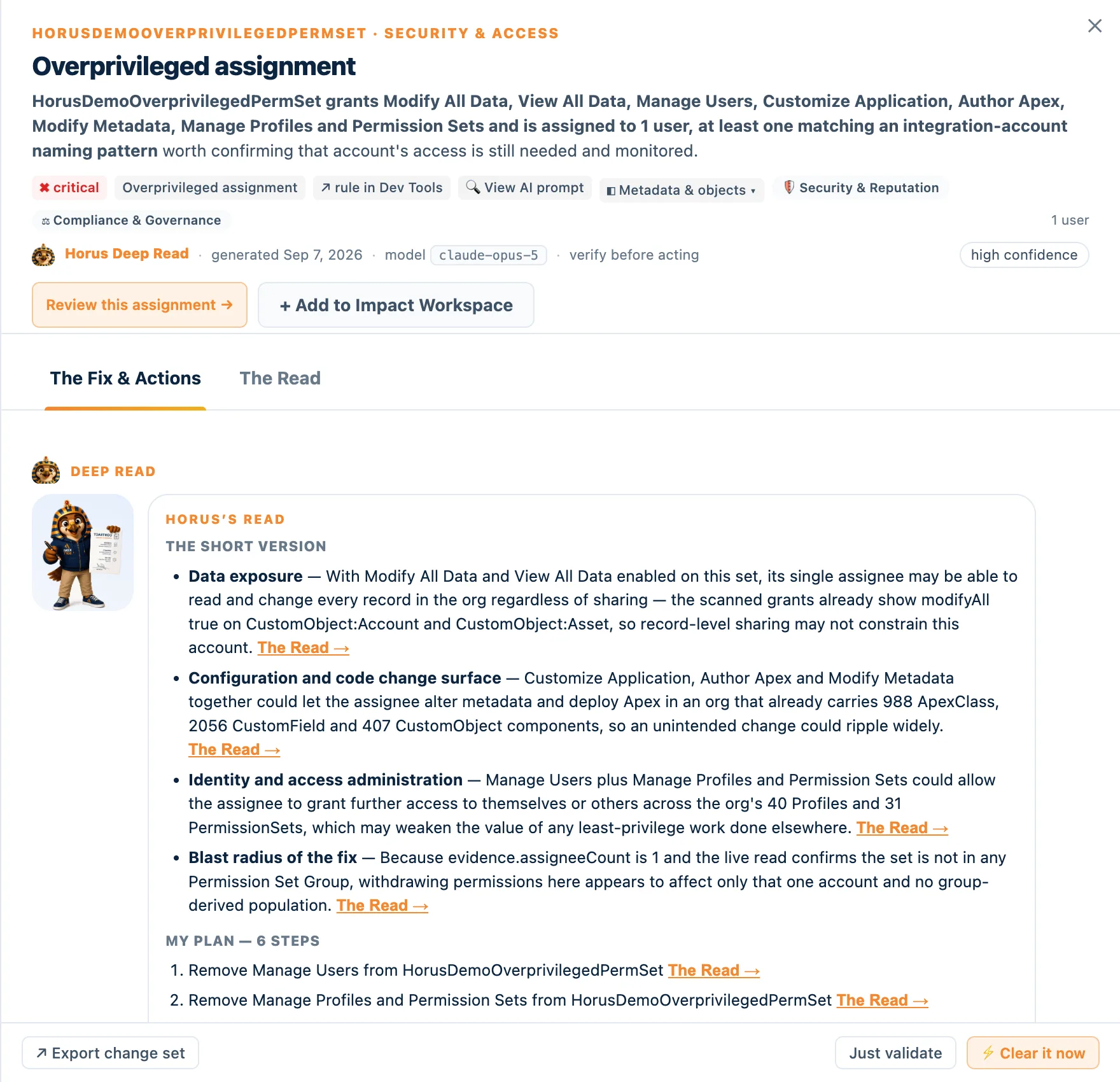
- HorusDemoOverprivilegedPermSet grants Modify All Data, View All Data, Manage Users, Customize Application, Author Apex, Modify Metadata, Manage Profiles and Permission Sets — and is assigned to 1 user matching an integration-account naming pattern.
- Evidence
- Grant and assignment rows read from the org’s own configuration; the permission path diagrammed in Deep Read. Usernames masked — data minimization.
- Why it matters
- One credential can read, change and export everything — and change who else can. If that integration is compromised or misbehaves, sharing offers no protection.
- Recommendation
- Withdraw the policy-bypass system permissions the integration does not use; keep API access. Horus asks the integration owner’s question first, then applies the withdrawals as reversible, per-step-approved operations.
- Confidence
- High — observed grants and assignment
The strongest clearing story in the product
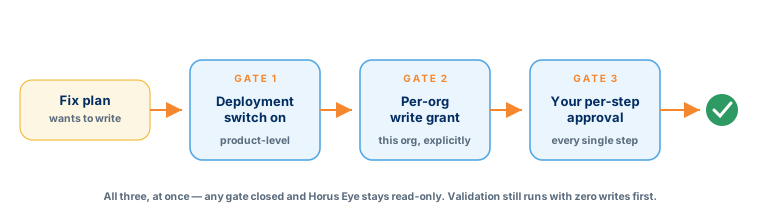
The full journeyAccess hygiene is where automated remediation is genuinely safe — the operations are withdrawals, not designs. The complete journey: Horus investigates the finding, writes the fix plan, asks the one question only the owner can answer, you approve each step, validation runs with zero writes, Fix it executes, rollback stands ready, and the re-scan proves the finding cleared.
What stays with humans: sharing-model redesign, role hierarchy strategy, the judgment of which integration needs what. That is a Health Assessment conversation — run on this evidence.
Frequently asked questions
Straight answersHow do I audit Salesforce permission sets?
Grade by exercisability: admin-tier grants first, then who holds them — integration patterns, inactive accounts, ordinary users — then duplication against profiles, then the unassigned. Horus Eye reads all of it from configuration and never stores usernames.
What can a Salesforce guest user really see?
What the guest profile grants, adjusted by guest sharing rules and site configuration. The scan lists the object-level grants and says plainly what it did not inspect — whether a public page actually surfaces the data.
Modify All vs View All — what’s the difference in risk?
View All bypasses sharing to read; Modify All bypasses it to read, change and delete. Both are sharing bypasses — which is why Horus Eye reports them separately in its Security Exposure measure rather than blending them into one number.
How do I find dormant admin users?
Cross accounts that hold privileged grants against login activity. Dormant privileged accounts are high severity for a reason: they are the attack surface nobody is watching. A disabled login, by contrast, has no live blast radius — and the rules treat it that way.
Can Horus Eye change permissions for me?
Yes: withdrawals, duplicate- grant removal, inactive-assignment cleanup and set retirement — per-step approved, zero-write validated, reversible, refused on managed packages, re-scan verified.
Does this help with Salesforce HIPAA compliance?
It produces the access evidence a compliance program needs — who can exercise what against patient-adjacent objects, sharing bypasses, dormant privileged accounts — in a form an assessor can read. Horus Eye is not a certification and doesn’t claim your org is HIPAA compliant; it shows the least-privilege reality that Salesforce HIPAA compliance work has to start from.
Protected AI — the Trust Layer
Every AI read in Horus Eye is metadata-first: built from an allowlist, sanitized by pattern, made through one audited gateway and checked by an output firewall on the way back — and AI is off by default, per org. Every request carries an audit id and an AI Data Scope manifest you can open.
Answer the auditor before the audit
One read-only scan produces the access picture — graded by who can exercise what — and the queue of exposures that could be withdrawn this week.
Try Horus Eye Review Your Org With an Architect All Horus Eye pages