Horus Eye · Change Impact
Know what breaks before you change it
The most expensive sentence in Salesforce delivery is “that shouldn’t affect anything.” A field rename breaks an integration three systems away; a deactivated Flow turns out to be load-bearing for a report the CFO reads. Horus Eye answers the question before the change: what depends on this, how far does the change reach, and who feels it. That is Salesforce change impact analysis as evidence — not as a meeting where everyone guesses politely. Protect your next release before the first change is made.
What Horus sees
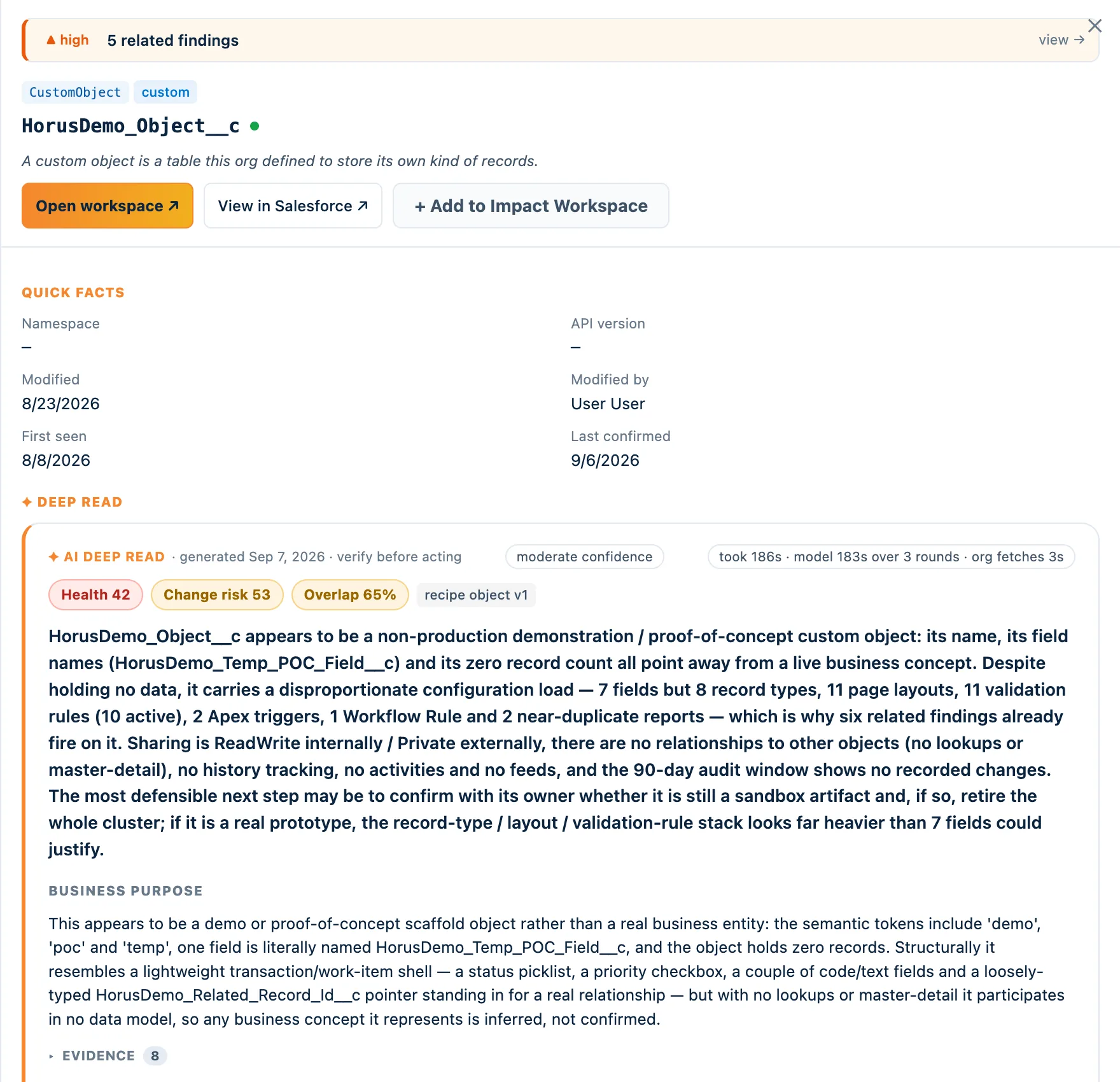
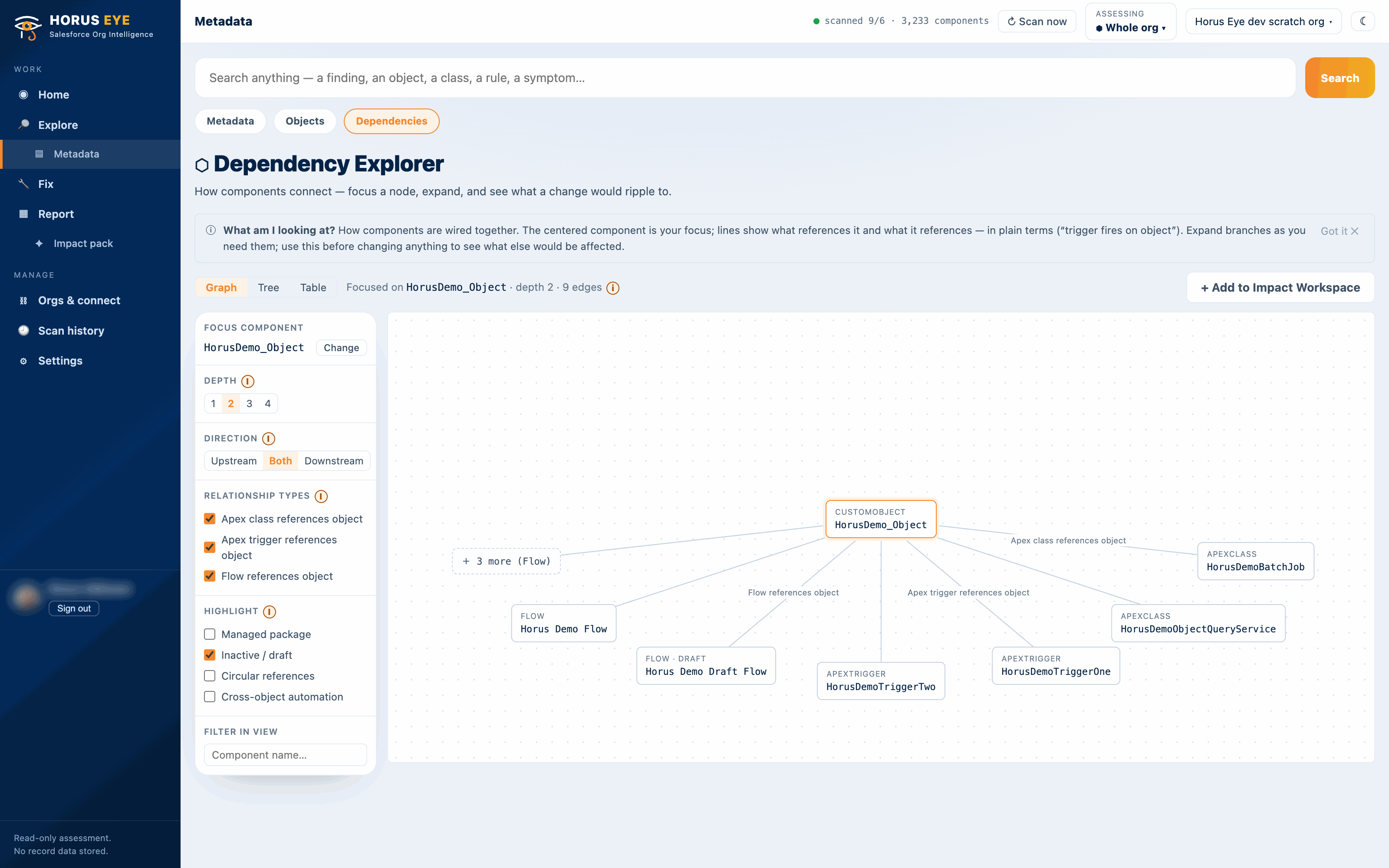
The signature differenceA Salesforce admin sees a field: Approval_Required__c. Horus Eye sees the three Flows,
the Apex trigger, the fourteen reports, the two integrations and the approval process that depend on
it — because the dependency records, read together, are the org’s real shape. That difference
is this entire page.
Why impact analysis fails when it’s manual
Symptoms“Where is this used?” in Setup answers for one component at a time, within what it can see, and someone still has to walk every result. So teams test half the org for a one-field change — or skip the analysis and find the dependency in production. Both outcomes trace to the same gap: the org’s dependency knowledge lives in Salesforce’s metadata records, in people’s memories, and nowhere in between.
Horus Eye reads the Metadata Dependency records across the org — including across package boundaries — into one explorable graph, and Deep Read turns any node into a change-impact answer: affected components by type and by hop, users affected, a 0–100 blast-radius score and a plain-English statement. And it names what dependency data cannot see — reports, list views, dashboards, API consumers — so the answer is always “at least this,” never false comfort.

One field, 47 downstream components
- What Horus Eye detected
- A single Opportunity field participates in 47 downstream components across Flow, Apex, reporting and integration metadata — strictly above the org’s own 95th percentile for field dependency.
- Evidence
- Distinct referencers counted by type and name from the dependency records (a four-version Flow counts once, not four times); reports and API consumers are additional and uncounted.
- Why it matters
- Nothing is broken. This is a note about cost: changing the field’s type, values or availability means moving all 47 together, and retiring it is a project, not a delete.
- Recommendation
- Budget any change against the full dependant list up front; check the invisible surfaces (reports, list views, integrations) before committing — discovering these one at a time mid-change is what this finding exists to prevent.
- Confidence
- Moderate — dependency records observed; API-level consumers not visible
Sequenced, then cleared
The clearingImpact analysis is what makes clearing safe. The orphaned-component and inactive-only-automation findings become deletable candidates only after the blast radius says nothing live leans on them — and then the retirements run as approved, reversible steps, with the re-scan confirming the graph changed the way the plan said it would. For change programs bigger than a cleanup, Kemisoft’s architects sequence the work on this evidence.
Frequently asked questions
Straight answersHow can I find Salesforce dependencies?
Salesforce records metadata references in the MetadataComponentDependency data; Horus Eye reads it org-wide into one graph, across package boundaries. What it cannot record — reports, list views, API consumers — is exactly where manual verification still earns its keep.
How do I know what will break if I change a field?
Read the dependants by type and hop, weight by criticality and activity, check the invisible surfaces, then plan. The blast-radius score exists so that judgment starts from evidence.
Does “Where is this used?” cover everything?
No — it is per-component, within recorded references only. Useful for one question; not an impact analysis.
What is a blast radius?
Everything a change can reach: direct dependents, their dependents, and the users behind them — scored 0–100 from reach, criticality and activity so changes can be compared and sequenced.
How does this reduce Salesforce regression testing?
By scoping it. Salesforce regression testing without impact analysis tests everything or guesses; with the blast radius in hand, the suite covers what the change can actually reach — plus the standing blind spots dependency data cannot see. Horus Eye doesn’t run the tests; it tells the testing where to look.
Protected AI — the Trust Layer
Every AI read in Horus Eye is metadata-first: built from an allowlist, sanitized by pattern, made through one audited gateway and checked by an output firewall on the way back — and AI is off by default, per org. Every request carries an audit id and an AI Data Scope manifest you can open.
Ask before, not after
Point Horus Eye at the org and get the dependency graph, the blast radius per component, and the confidence to schedule the change.
Try Horus Eye See What Horus Eye Finds All Horus Eye pages