A relationship reads an object the scan did not find
What it may meanGeneration fails or returns no data
How to fix it MConfirm whether the object exists; point the relationship at the right object, remove it, or grant the scanning user access — then re-scan
DocGen admin
A template row has no backing file
What it may meanGeneration fails at run time
How to fix it SReattach or remove the template; generate once; re-scan
DocGen admin
The package’s starting object is not found
What it may meanThe package cannot start
How to fix it MRe-point the starting object, or retire the package
DocGen admin — or applied for you once your decision is recorded
A package is missing templates or delivery
What it may meanNo finished document
How to fix it SAdd the missing piece, or retire the package
DocGen admin
Duplicate packages, none clearly the working copy
What it may meanUsers pick the wrong one
How to fix it MName the keeper; move unique templates and options into it; retire the copies (set inactive, reversibly — nothing deleted)
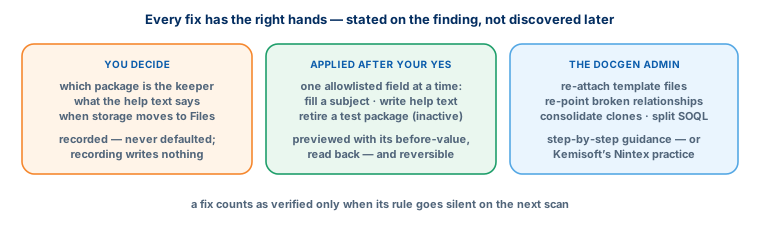
You decide; applied after your answer
Test or copy-named packages active in production
What it may meanTest output reaches real recipients
How to fix it XSRetire them, or rename them if they are real
You decide; applied after your answer
Versioning by cloning (v1 / v2 / FINAL)
What it may meanMore to maintain; user confusion
How to fix it MConsolidate to one package
DocGen admin
An e-mail option with no subject or body source
What it may meanE-mails go out empty or inconsistent
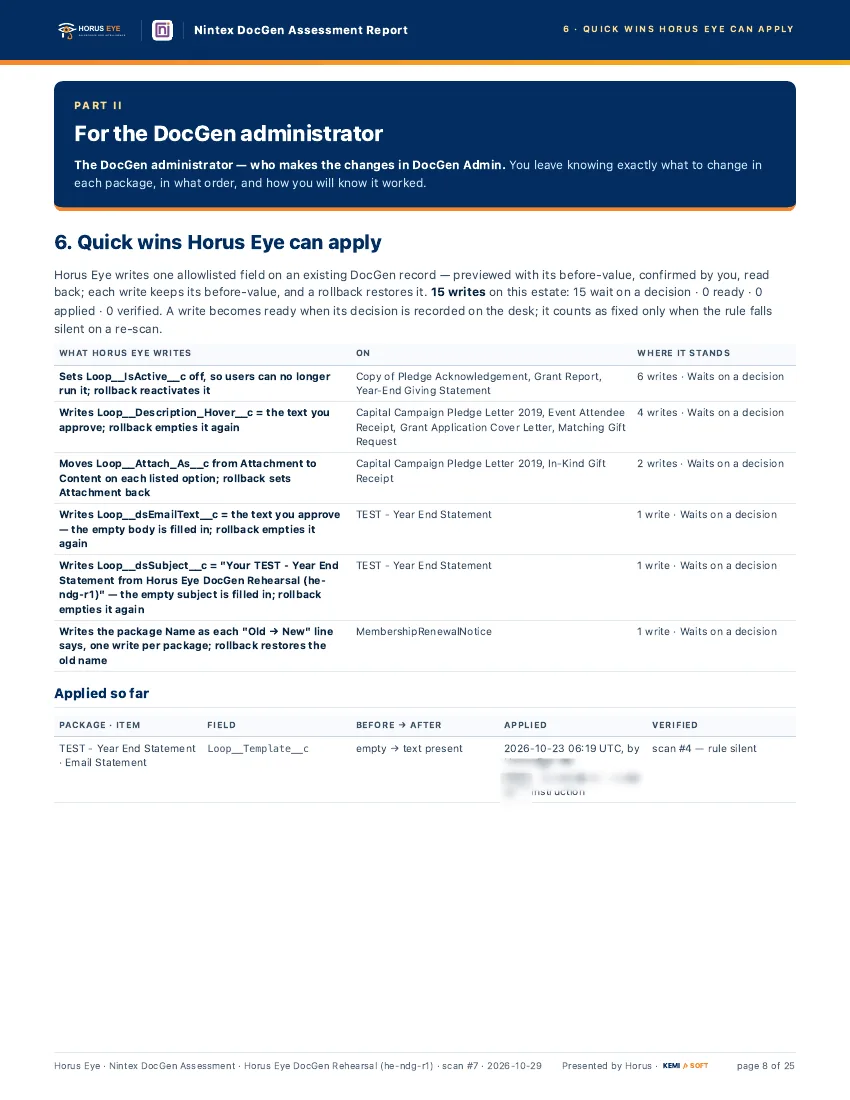
How to fix it XSFill the subject or body you approve — a one-field write, previewed with its before-value and reversible
You decide; applied after your answer
E-mail wording typed inline rather than from a template
What it may meanWording drifts apart across options
How to fix it SChoose a Salesforce e-mail template so the wording lives in one place
Delivery options without help text
What it may meanUsers guess which option to use
How to fix it XSApprove the help text once; it is written for you
You decide; applied after your answer
One delivery named different ways across packages
What it may meanUsers don’t recognize it
How to fix it SPick one word and use it everywhere
You decide; applied after your answer
Output stored as classic Attachments; templates stored as Attachments or Documents
What it may meanDepends on storage being retired
How to fix it MPlan the move to Files; storage settings can be switched one option at a time, reversibly
You decide; applied after your answer
Macro-enabled Office templates
What it may meanSecurity and compatibility risk — and the macros do not run during generation anyway
How to fix it SSave in the standard format unless the macro is genuinely needed
DocGen admin
Requires an attachment but does not allow attachments
What it may meanContradictory settings
How to fix it XSAlign the two settings
DocGen admin
An outlier number of always-included templates
What it may meanSlow, heavy generation
How to fix it MUse conditional content, or split the package
DocGen admin
Where a fix is applied for you, it is one allowlisted field on an existing DocGen record:
previewed with its before-value, confirmed by you, read back after writing, and reversible on
request. A fix counts as verified only when the rule that raised it goes silent
on the next scan — not when the change is made.