Horus Eye · NPSP → Agentforce Nonprofit
The sixteen decisions every NPSP migration must answer
The hard part of moving from Salesforce NPSP (the Nonprofit Success Pack) to Agentforce Nonprofit — the platform many teams still search for as Salesforce Nonprofit Cloud — is decisions, not data. The questions are the same for every NPSP org — how households are represented, what each gift becomes, how recurring giving continues — but the right answers are not. This index holds all sixteen named NPSP migration decisions, each with its options, consequences and owner, written for the Salesforce admins and product owners who will live with the answers.[1][2][4]
The decision journey, in the order it falls
Dependency OrderDecisions depend on each other. The target-org choice comes first, because Person Accounts cannot be switched off once enabled; the household model shapes gift classification; gift classification shapes recurring continuity. The rest can run in parallel — as long as each has a named owner.
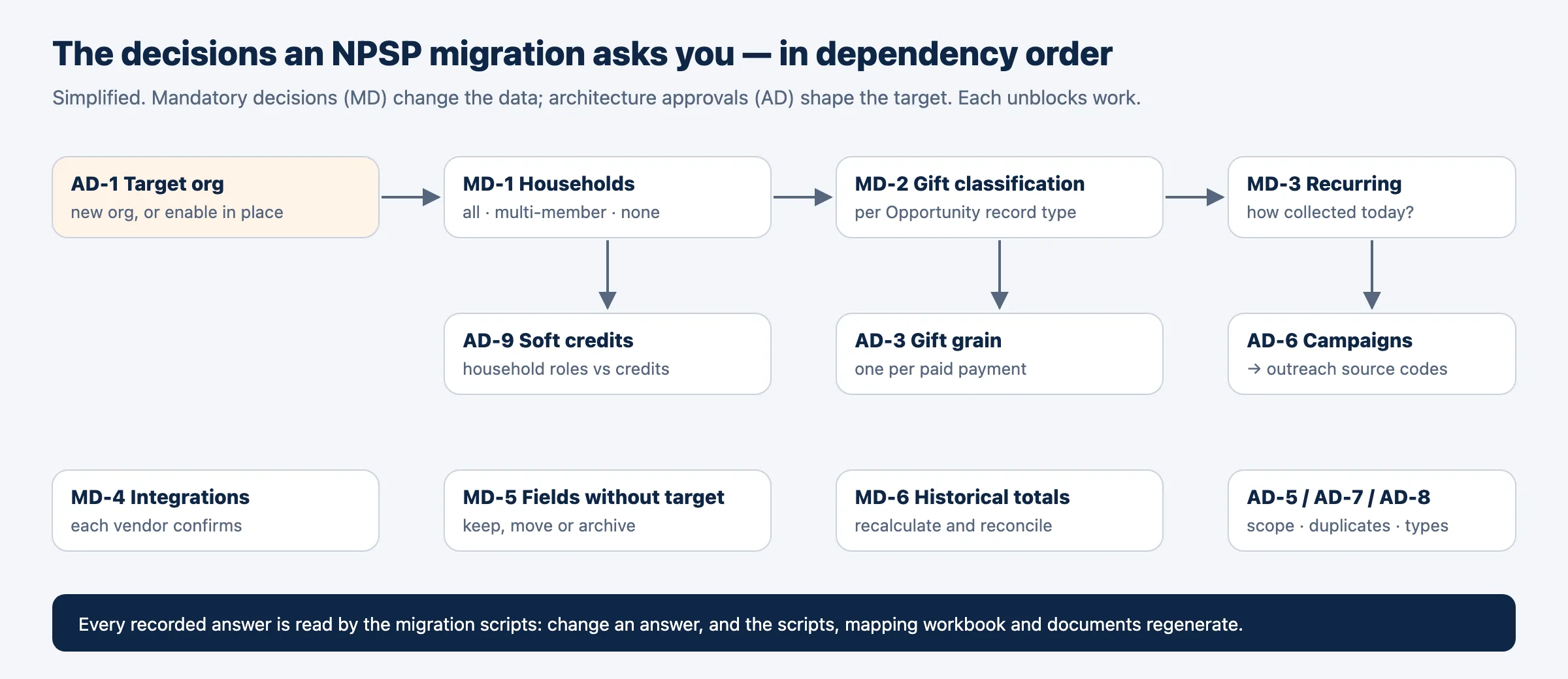
Mandatory migration decisions
They Change the DataThese change the data. Until each is recorded, the migration step that needs it waits rather than guessing — which is the behaviour you want from anything touching donor records.
| The question | Who decides | Effort | |
|---|---|---|---|
| MD-1 | How will households be represented in Agentforce Nonprofit? | Executive sponsor | L |
| MD-2 | What does each Opportunity record type become: Gift Transaction, Gift Commitment, or Opportunity? | Fundraising[3] lead | M |
| MD-3 | How are recurring donations collected today, and how will their schedules continue after migration? | Fundraising operations lead | L |
| MD-4 | Which installed packages and integrations must work with Agentforce Nonprofit — and has each vendor confirmed it? | Salesforce administrator | L |
| MD-5 | Where does the information in fields without a direct target go? | Salesforce administrator | XL |
| MD-6 | Which historical totals and reports must survive the migration — and how will they be produced? | Finance lead | M |
| MD-7 | Which Program Management data must migrate to the target program and benefit objects? | Program lead | M |
Architecture approvals
They Shape the TargetThese shape the target org. Each comes with a recommendation, its reasons, and what would change it — your organization approves.
| The question | Who approves | Effort | |
|---|---|---|---|
| AD-1 | A new Agentforce Nonprofit org, or transform NPSP in place? | Executive sponsor | S |
| AD-2 | Legacy Recurring Donations: upgrade to Enhanced in NPSP first, or transform the legacy structures directly? | Fundraising operations lead | M |
| AD-3 | Which source record becomes the Gift Transaction: the gift, its payment, or both? | Finance | S |
| AD-4 | Who sees and changes which records in the target — and with which licenses? | Executive sponsor | M |
| AD-5 | Which records outside the core migration move — and where does the rest go? | Data owners | M |
| AD-6 | Outreach Source Codes under the campaigns, or campaigns alone? | Fundraising lead | S |
| AD-7 | Do duplicate and matching rules run while the migration loads? | Data owner | M |
| AD-8 | Which record types does the target carry for people, accounts and gifts? | Solution architect | S |
| AD-9 | Do household members’ automatic contact roles become Gift Soft Credits? | Fundraising lead | S |
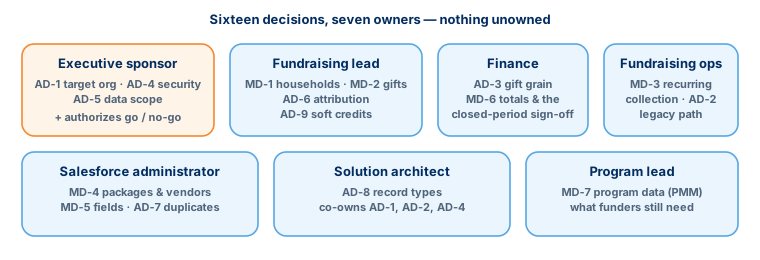
Who owns what
OwnershipA decision without an owner is a delay with a code name. This is how the sixteen split across the seven people every migration needs:
And then your org’s own questions
Beyond the SixteenThe sixteen NPSP migration decisions above are the named, recurring ones — the ones every project meets. They are not the whole conversation.
Beside the sixteen named decisions, every org gets its own preparation questions, raised by its findings — 35 of them on one of our test orgs (an example, not a norm). What happens to orphaned records? How are contacts that share an e-mail address resolved — same person, or different people? Are seasonal addresses still used? Each comes with a recommendation, so the common case is one click — and the uncommon case gets a real decision instead of a default.
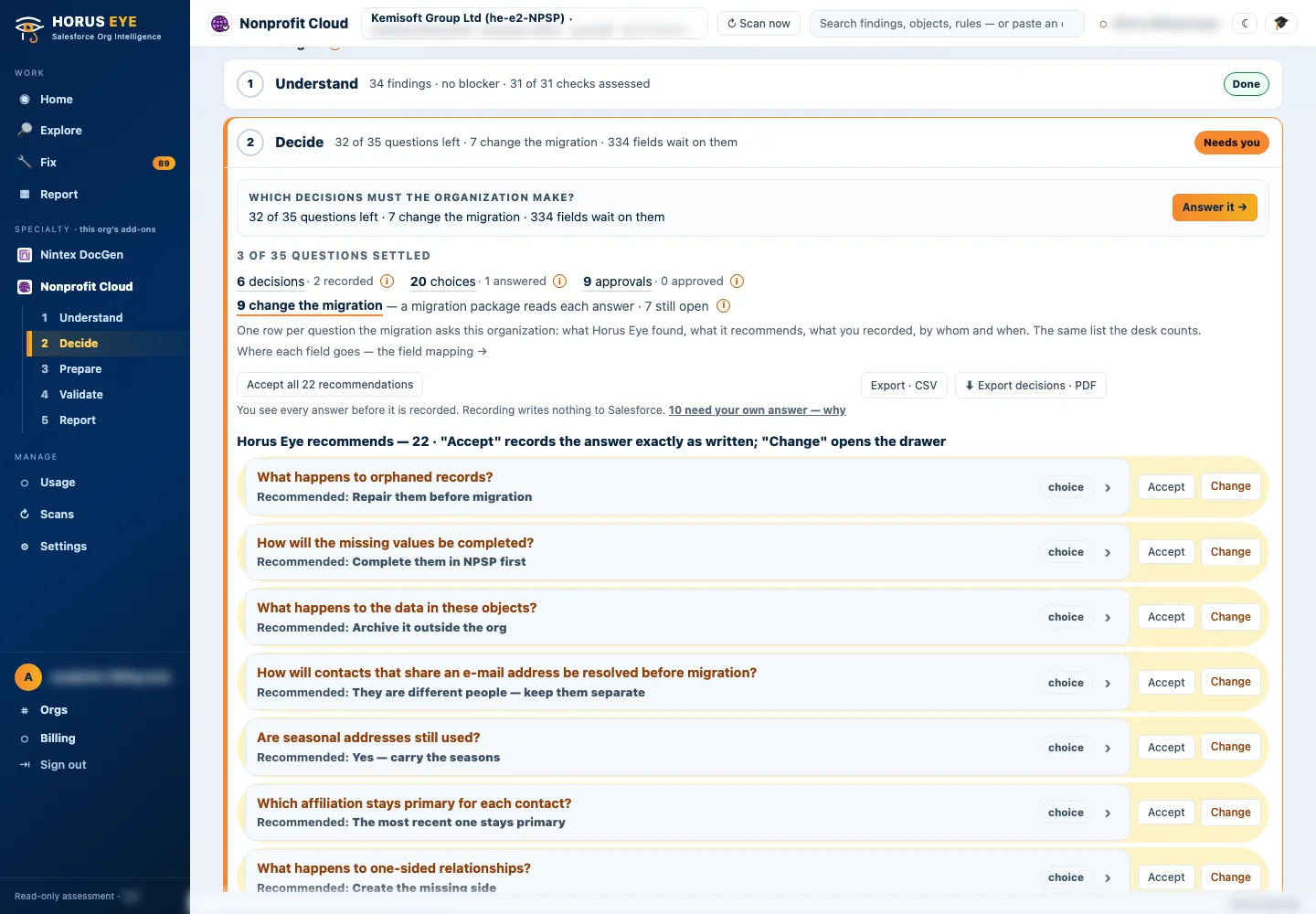
Every recorded answer lands in a decision register — who decided, what, and when — which is the document your auditors, your board and your implementation partner will all ask for.
About the figures on this page: counts and percentages describe Horus Eye’s own test orgs, which hold seeded example data. They are examples of what an assessment reports — never typical results and never a benchmark for your org.
Sources & further reading
ReferencesThe decision wording on these pages follows Salesforce’s own migration documentation; read the primary sources alongside any vendor’s summary, ours included.
- 1.
 Salesforce · Agentforce Nonprofit Migration Guide v2.0 (PDF) — The official guide this content follows: platform differences, migration recommendations, and how NPSP features map to Agentforce Nonprofit. ↩︎
- 2. Salesforce Help · Nonprofit Cloud Migration and Implementation Guides — Salesforce’s index of the migration, implementation, Fundraising and Program Management guides. ↩︎
- 3. Salesforce · Fundraising Implementation Guide (PDF) — How Fundraising is planned and configured in the target: processes, objects, gift entry, RFM scoring. ↩︎
- 4. Salesforce Help · Nonprofit Cloud Data Model Objects — The target objects, as Salesforce documents them. ↩︎
“Salesforce”, “Agentforce” and related marks are the property of Salesforce, Inc. Horus Eye is an independent product and is not affiliated with, endorsed, or sponsored by Salesforce, Inc.
Protected AI — the Trust Layer
Every AI read in Horus Eye is metadata-first: built from an allowlist, sanitized by pattern, made through one audited gateway and checked by an output firewall on the way back — and AI is off by default, per org. Every request carries an audit id and an AI Data Scope manifest you can open.
Which of these are already decided in your org?
Horus EyeA read-only assessment answers that with evidence: which decisions your data has already made for you, which are genuinely open, and who should own each one.
Try Horus Eye Free Request an Assessment All Horus Eye pagesFree start · 250 credits for 60 days · no card required · scans are free