Horus Eye · Nintex[1] DocGen
Your DocGen estate, graded: the report card explained
Nintex DocGen (Loop — the product many admins still know as Drawloop) estates rarely fail loudly. A package keeps its button, its name and its place in the menu long after the object it reads was renamed or the template file behind it went missing — it fails only when someone clicks it, often in front of a donor, a board or an auditor. The Nintex DocGen health report card turns that silence into a grade per area, so the admin knows what to look at first.[2]
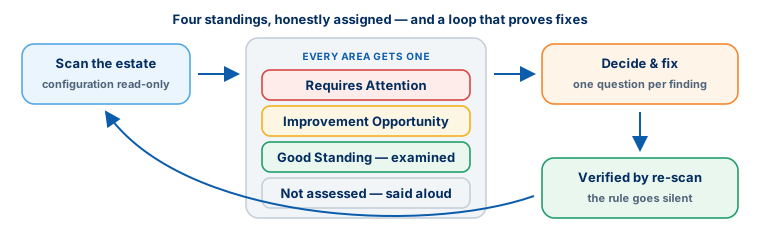
Four standings, honestly assigned
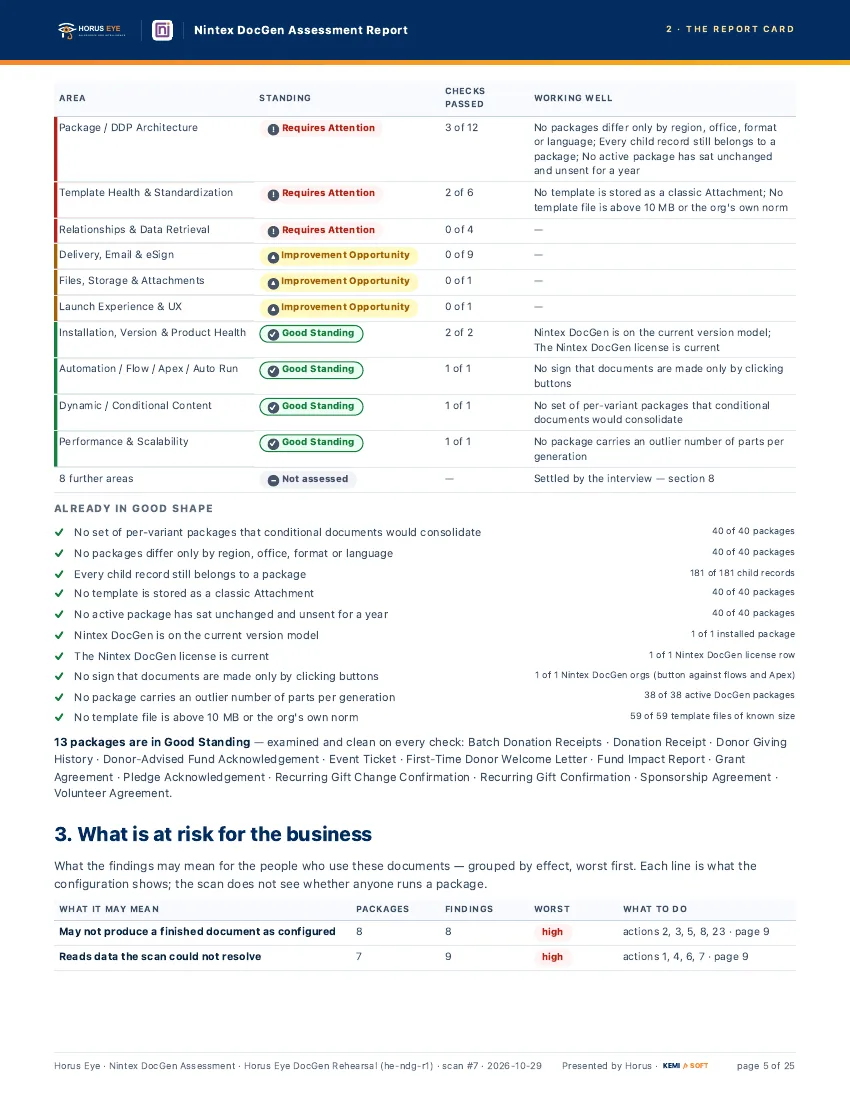
The GradesRequires Attention means a high or critical finding is open in the area. Improvement Opportunity means something is worth fixing but nothing is on fire. Good Standing means the area was examined and came back clean on every check — examined, not assumed. And Not assessed is said out loud: an area the scan could not reach is never quietly marked healthy.
The areas, and what each one looks at
Area by Area| Area | What it looks at |
|---|---|
| Package / DDP architecture | Duplicates and near-duplicates, versions made by cloning, incomplete packages, test or copy packages active in production, naming conventions |
| Template health & standardization | Missing template files, legacy storage (classic Attachments or Documents), macro-enabled formats, oversized files, test templates |
| Relationships & data retrieval | Relationships reading objects or lookups that could not be found; risky SOQL volume and constructs |
| Delivery, e-mail & eSign | Missing subject, body or help text; e-mail wording typed inline instead of a template; duplicate or mis-named delivery options |
| Files, storage & attachments | Generated output stored as classic Attachments; attachment settings that contradict each other |
| Launch experience & UX | How users start generation: buttons, labels, and choices left fully open when one was intended |
| Installation, version & product health | Loop version model, license currency, seats assigned against seats used |
| Automation / Flow / Apex / auto-run | The balance of button-run against automated generation; legacy outbound messages that should be Flows |
| Dynamic / conditional content | Per-variant package families that one conditional package could replace |
| Performance & scalability | Packages assembling an outlier number of parts per generation |
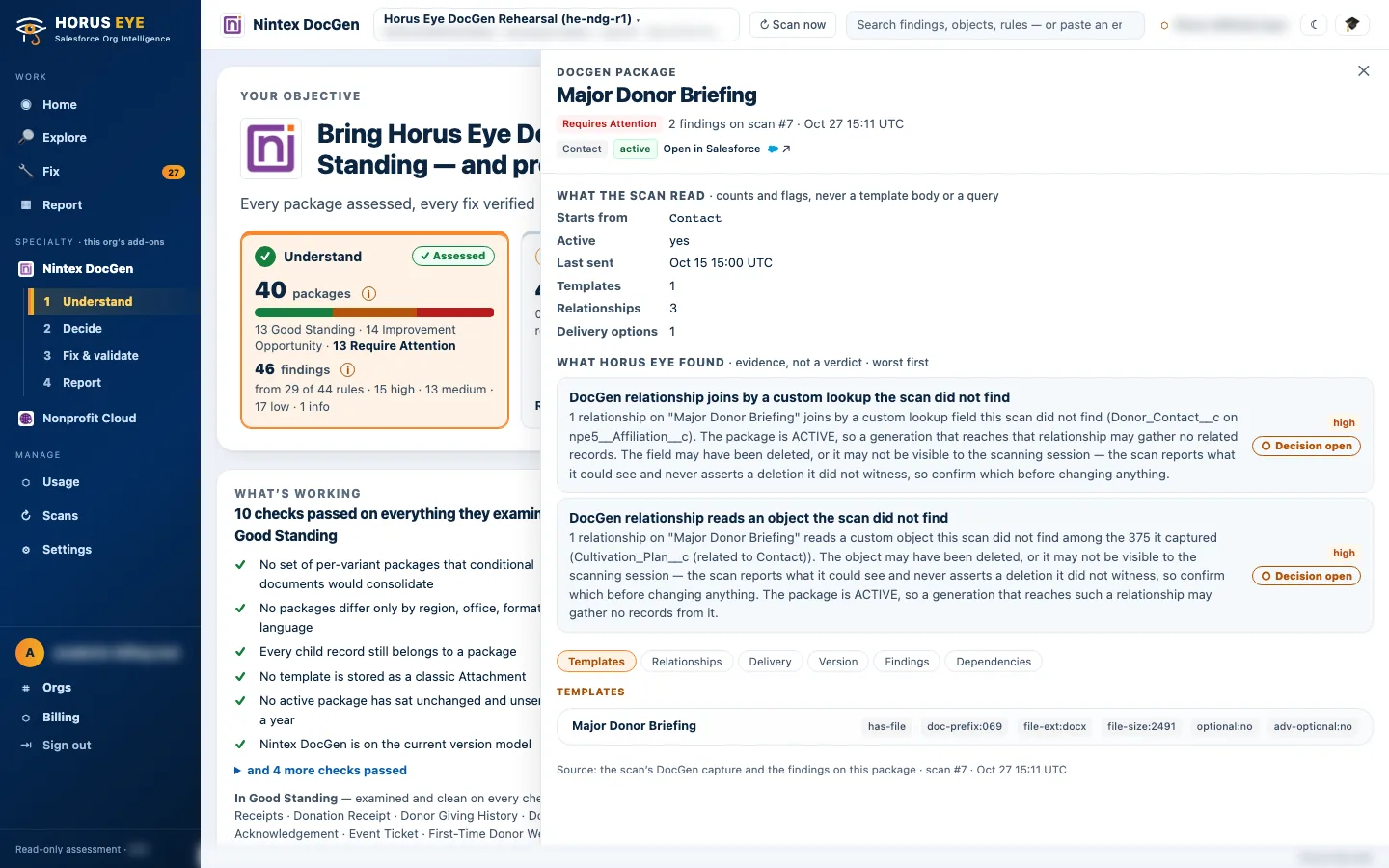
Some things configuration cannot answer — branding consistency, document standards, testing practice, ownership. Those are settled by a short interview: the administrator answers in place, partly in place or not in place for each, and the answers join the scorecard rather than being guessed.
Ten things DocGen admins tend to discover the hard way
Hard-Won Lessons- “It still has a button” is not “it still works”. A package can point at a template row with no file behind it, or read an object that no longer exists — nothing warns you until generation runs.
- A broken relationship has three possible truths. The object is gone (re-point it), the relationship is obsolete (remove it), or the object exists but the scanning user cannot see it (grant access and re-scan). Only you know which — which is why it is a question, not an auto-fix.
- Clones are how estates sprawl. “v2”, “FINAL”, “Copy of…” — users pick the wrong one, and every fix is made several times over. Keep one; the one sent most recently is usually the safest keeper.
- Test packages in production reach real people. Anything named TEST, SAMPLE or COPY that is active in production can send test wording to real recipients.
- An empty subject line is a reputational defect. E-mail options with no subject or body source send blank, or leave it to the user to type.
- Classic Attachments and Documents are on borrowed time. Files are where Salesforce steers new work; plan the move.
- JavaScript buttons don’t run in Lightning. Users there may not be able to generate at all.
- Generation started by a legacy outbound message is invisible debt. It still works — from automation Salesforce has moved away from in favour of Flow.
- SOQL relationships are an escape hatch, not a default. Heavier to maintain, slower, and some constructs — like line breaks inside the query — are documented causes of generation errors.
- Macro-enabled templates are a security review waiting to happen — and DocGen does not run a template’s macros while generating, so the macro may be doing nothing at all.
About the figures on this page: counts and percentages describe Horus Eye’s own test orgs, which hold seeded example data. They are examples of what an assessment reports — never typical results and never a benchmark for your org.
Sources & further reading
References- 1. Nintex · DocGen for Salesforce Documentation — The vendor’s own documentation for packages, templates, relationships and delivery. ↩︎
- 2.
 Salesforce Help · Migrate to Flow Tool — Salesforce’s path off workflow rules and Process Builder — the context for modernizing legacy outbound-message automation. ↩︎
“Salesforce”, “Agentforce” and related marks are the property of Salesforce, Inc. Nintex and DocGen are marks of Nintex. Horus Eye is an independent product and is not affiliated with, endorsed, or sponsored by Salesforce, Inc. or Nintex.
Protected AI — the Trust Layer
Every AI read in Horus Eye is metadata-first: built from an allowlist, sanitized by pattern, made through one audited gateway and checked by an output firewall on the way back — and AI is off by default, per org. Every request carries an audit id and an AI Data Scope manifest you can open.
Get your DocGen grade now
Horus EyeA read-only assessment answers it area by area, with the evidence behind every standing — and “not assessed” stated out loud where it applies.
Try Horus Eye Free Request a DocGen Assessment All Horus Eye pagesFree start · 250 credits for 60 days · no card required · scans are free