Horus Eye · FAQ
Horus Eye FAQ: what admins and security teams actually ask
This Horus Eye FAQ gives straight answers about how the product works: what the AI is given and what it never touches, what a scan reads, who can change what, and how teams share an assessment. Where something is a policy rather than a product control, it is called a policy.
What is Horus Eye?
Horus Eye is a Salesforce assessment and action-planning product from Kemisoft. It helps teams understand findings about their org, evaluate the options, and prepare remediation or migration work — with every finding tied to the evidence behind it. Today it has two specialist desks: NPSP → Agentforce Nonprofit migration, and Nintex[2] DocGen estate health.
Does AI scan my entire Salesforce org?
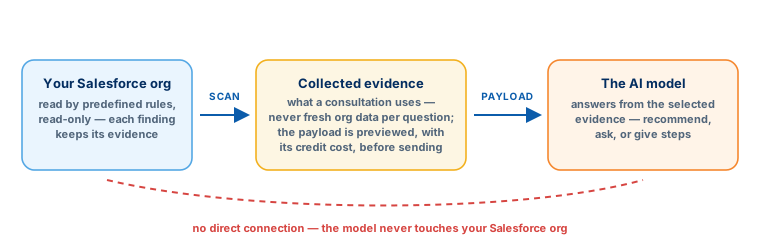
No. Detection uses predefined rules that look for known patterns and collect the evidence each one needs — not an AI exploring the org. When you ask for AI guidance on a finding, the selected evidence is supplied to the model; the model does not connect to your Salesforce org.
Can I see what is sent to the AI?
Yes. The consultation shows the proposed payload before you proceed, along with the credit cost — so you can read exactly what would be sent, and decline.
Is every finding generated by AI?
No. Findings come from predefined rules, each with the evidence it collected. AI assistance is optional, per consultation, and bounded by the finding and its options.
Can Horus Eye fix everything automatically?
No, and it does not claim to. Each finding carries one of three approaches: automated (a supported operation applies the fix after your approval), guided (evidence-based options with steps you follow through), or manual (instructions for changes that need hands-on implementation).
Will it change my org during an assessment?
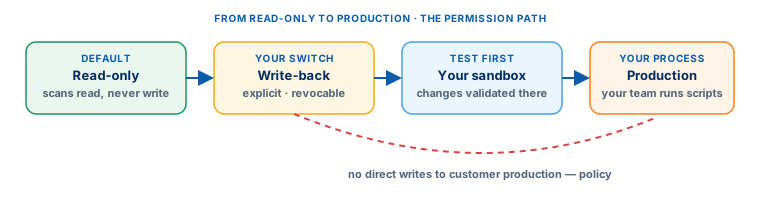
No. The connection is read-only by default: scans read configuration and metadata. Write-back is a separate, explicit permission — off until you enable it, revocable at any time — and even then, supported changes happen only after your approval, one at a time.
Can it make changes directly in production?
The working policy is no direct writes to customer production environments. Changes are tested in a sandbox first; prepared scripts are then run in production by your team or delivery partner, inside your own change process.
Does asking a question refresh the scan?
No. A consultation uses the evidence already collected during the scan. To refresh the evidence, run a new scan — which also proves whether earlier fixes worked, because a fix counts as verified only when its rule goes silent.
Can my team work from the same assessment?
The owner of a connected org can share it, and shared access includes the existing scan history. Note that independently connecting the same Salesforce org creates a separate connection with its own history — share the existing connection instead.
Can I assess a GitHub repository instead of a live org?
A repository connection is available, with more limited coverage than a live org connection — runtime information simply is not in a repo. It suits a first look at code and configuration under version control. Note that signing in with GitHub is only authentication: it does not give Horus Eye access to any repository. Connecting a repo is a separate, explicit step.
How do connections work?
Sign in with Google, GitHub or e-mail. A Salesforce org connects through OAuth (refreshable) or a temporary session (typically around two hours before reconnection). OAuth is the comfortable default for ongoing work.
What does the nonprofit migration workflow produce?
Findings with evidence, recorded decisions with their rationale, field mappings, generated migration scripts, validation that compares source and target on your own sandbox, and the delivery documents: strategy and architecture, design specification, action plan, a Jira-ready backlog, a mapping workbook[1], readiness reports and bundled downloads.
Can we begin with just an assessment?
Yes — that is the intended starting point. Authorize a read-only assessment, get the report, and decide what to do next with the evidence in hand. Talk to us about scope and authorization.
Sources & further reading
References- 1.
 Salesforce · Agentforce Nonprofit Migration Guide v2.0 (PDF) — The official guide this content follows: platform differences, migration recommendations, and how NPSP features map to Agentforce Nonprofit. ↩︎
- 2. Nintex · DocGen for Salesforce Documentation — The vendor’s own documentation for packages, templates, relationships and delivery. ↩︎
“Salesforce”, “Agentforce” and related marks are the property of Salesforce, Inc. Nintex and DocGen are marks of Nintex. Horus Eye is an independent product and is not affiliated with, endorsed, or sponsored by Salesforce, Inc. or Nintex.
Protected AI — the Trust Layer
Every AI read in Horus Eye is metadata-first: built from an allowlist, sanitized by pattern, made through one audited gateway and checked by an output firewall on the way back — and AI is off by default, per org. Every request carries an audit id and an AI Data Scope manifest you can open.
A question this page doesn’t answer?
Horus EyeAsk it of an architect — including the security and data-handling questions. Evidence first, on both sides.
Try Horus Eye Free Ask an Architect All Horus Eye pagesFree start · 250 credits for 60 days · no card required · scans are free