Horus Eye · Comparison Guide · As of October 2026
Claudeforce, AIforce and Salesforce AI — where Horus Eye fits
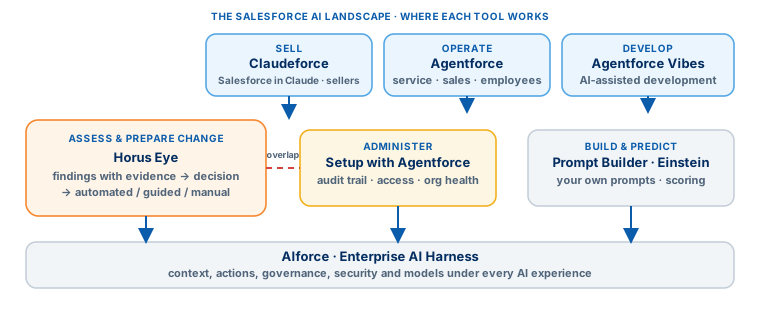
Salesforce AI now covers several different needs: Claudeforce[1] brings Salesforce context to sellers inside Claude, AIforce[4] builds the enterprise harness underneath every AI experience, Agentforce runs operational agents, and Einstein predicts outcomes. Horus Eye does something narrower on purpose: it assesses your Salesforce environment and organizes what happens next — predefined findings with supporting evidence, remediation options, and specialized workflows for DocGen assessment and nonprofit migration planning. The right choice depends on the work you need done, and these tools can serve different roles in the same org.
The Salesforce AI landscape at a glance
Eight Tools, One Table| Product or capability | Documented focus | Where Horus Eye fits |
|---|---|---|
| Horus Eye | Rule-based Salesforce assessment: evidence-backed findings, remediation guidance, a DocGen health assessment, and NPSP/PMM → Nonprofit Cloud migration preparation. | The structured workflow from finding to decision to next action. |
| Claudeforce / Salesforce in Claude[2] | The Salesforce–Anthropic partnership: Salesforce context and sales workflows inside Claude, launching with 37 prebuilt sales skills (documented as a beta[3]). | Horus Eye works on the org and its assessment findings, not the seller’s revenue workflow. |
| AIforce / Enterprise AI Harness | Salesforce’s foundation for making business context, actions, governance and models accessible across AI experiences — headless, via MCP, APIs, skills and plugins. | Horus Eye packages one specific assessment-and-remediation process rather than general AI infrastructure. |
| Agentforce | Autonomous agents[5] for customer service, sales, employee support and other operational workflows. | Horus Eye assesses the environment those agents will run in, and prepares the changes. |
| Setup with Agentforce[6] | Conversational administration: audit-trail review, user-access troubleshooting, org health and license usage. | Real overlap — compare assessment coverage, evidence, remediation and deliverables for your requirements. |
| Agentforce Vibes[7] | AI-assisted Salesforce development: org metadata, planning, code generation, testing and deployment tooling. | Horus Eye assesses supported patterns and prepares responses; Vibes helps implement broader development work. |
| Prompt Builder[8] | Reusable, grounded prompts that participate in Salesforce workflows. | A toolkit for building your own AI experiences; Horus Eye is a packaged assessment workflow. |
| Einstein predictions | Predictive scoring[11] — which leads convert, which opportunities close. | Horus Eye findings concern assessment and change planning, not sales-outcome prediction. |
Descriptions summarize Salesforce’s own documentation, linked under Sources below, as of October 2026.
Horus Eye vs. Claudeforce
Assessment Work vs. Sales WorkClaudeforce is the Salesforce–Anthropic partnership, announced August 26, 2026. Its first offering, Salesforce in Claude, brings Salesforce context into Claude with 37 prebuilt skills for sales activities — meeting preparation, account planning, pipeline review — with authentication and permissions managed centrally and actions routed through Salesforce business rules. Salesforce documents it as a beta, so check current availability before you plan around it.
Horus Eye starts somewhere else entirely: with an assessment. Predefined rules identify supported patterns in your org and collect the evidence behind each finding; you review the finding, weigh the options, and use automated, guided or manual approaches where supported.
Consider Salesforce in Claude when the priority is helping sellers work with Salesforce context inside Claude. Consider Horus Eye when the priority is reviewing assessment findings and preparing remediation or migration work. A sales team and an admin team can happily run both.
Horus Eye vs. AIforce
Infrastructure vs. a Packaged ProcessAIforce is bigger than any single assistant. Salesforce describes its Enterprise AI Harness as the trusted foundation connecting business context, actions, security, governance and models across AI experiences — built headlessly, reachable through MCP, APIs, skills and plugins, with some capabilities on a staged rollout. It is infrastructure for building and connecting AI experiences across an enterprise.
Horus Eye packages one specific process on top of whatever infrastructure you run: detect a supported pattern, collect the relevant evidence, review the options, prepare the action. For an assessment team the practical question is not either–or: do you need infrastructure for building AI experiences, or a product that already organizes a defined assessment workflow? Adopting enterprise AI infrastructure does not by itself decide which assessment rules, migration decisions or delivery documents your team needs.
Horus Eye vs. Agentforce — and Setup with Agentforce
The Honest OverlapAgentforce runs autonomous agents for operational work — service cases, sales development, employee support — with prebuilt actions, business context and human oversight. Horus Eye addresses a different starting point: what the assessment found, and what your team should review or change. A service agent resolves a customer’s request; Horus Eye helps a team investigate a configuration finding; a migration team records mapping decisions and prepares implementation materials. Different jobs, same org.
Setup with Agentforce is the closest overlap, and it deserves a straight comparison rather than a dismissal. Salesforce documents audit-trail queries, user-access troubleshooting, permission changes, security health review and license-usage information — real capabilities that touch the same conversation Horus Eye lives in. Horus Eye’s workflow adds grouped findings with severity and affected components, scan history, evidence attached to every finding, explicit automated/guided/manual response paths, recorded business decisions, and exportable assessment and migration deliverables. A useful evaluation asks:
- Which conditions does each product detect — and what evidence explains each finding?
- Which actions are automated, guided, or manual — and how are business decisions recorded?
- What can the team export for implementation and review?
- Which specialized packages and migration scenarios are covered?
Choose on demonstrated coverage and results in your own environment — the same authorized sandbox, the same defined requirements, both products.
Horus Eye vs. Vibes, Prompt Builder & Einstein
Different Questions, Different ToolsAgentforce Vibes
AI-assisted Salesforce development: plans before it acts, works from org metadata and project files, generates and tests code, with checkpoints and human review. Evaluate Vibes when you need development help implementing changes; evaluate Horus Eye when you want findings organized into reviewable next steps. Many teams will use an assessment to define the work and a development assistant to help build what falls outside the assessment’s supported operations.
Prompt Builder
Reusable AI prompts grounded in business information — Salesforce also documents using Flow to add logic[10] and context to prompt templates. It is a toolkit for creating your own AI experiences; Horus Eye is a packaged assessment workflow you run, not one you build.
Einstein predictions
Predictive scoring answers which leads are more likely to convert and which opportunities are more likely to close. Horus Eye answers assessment questions: what was detected, what evidence supports it, and which response options exist. Choose the capability that matches the decision you need to make.
What makes Horus Eye’s approach distinctive
Five Design Choices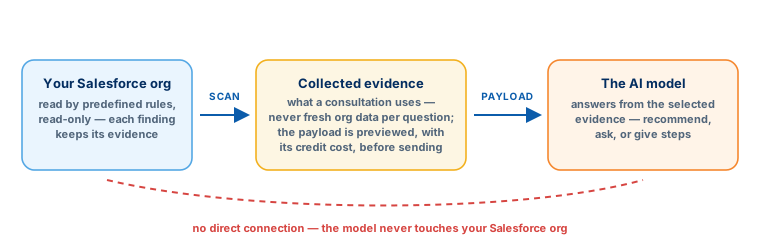
Detection uses predefined rules
Known patterns are identified without asking an LLM to discover each issue by exploring the org. AI assistance appears inside supported consultations and guided decisions — bounded, not exploratory.
Evidence stays connected to the finding
The scan collects exactly the information each rule defines, so every review starts from a specific factual basis rather than a model’s impression.
You can inspect the proposed AI payload
The consultation shows what would be sent to the model, and the credit cost, before you proceed — and you can decline.
Findings lead to explicit response options
Automated, guided and manual approaches distinguish what the product can perform from what still requires your hands.
And specialized workflows produce delivery materials: the nonprofit migration desk connects findings and recorded business decisions to mapping workbooks, scripts, validation and planning documents — see the deliverables page by page. None of this claims exclusivity: Salesforce documents governance and security across its own AI stack, including the Einstein Trust Layer[9]. The comparison worth making is evidence and workflow design, on your org.
Frequently asked questions
Straight AnswersIs Horus Eye a replacement for Salesforce AI?
No. It addresses a specific assessment and remediation need, and sits comfortably alongside the tools your sellers, service team, admins and developers use. Several of the products above can serve different roles in the same Salesforce environment.
Is Horus Eye the only option with governance or guardrails?
No, and we won’t pretend otherwise. Salesforce documents governance and security capabilities across its AI offerings, with applicability depending on the feature. Compare Horus Eye on its evidence discipline and workflow design — not on a claim of exclusive safety.
Does Horus Eye’s AI connect directly to Salesforce?
No. In the architecture described by the product team, the scan collects evidence and a consultation supplies selected evidence to the model. The model does not connect to the org, and the proposed payload is shown before you proceed. The Trust Layer in depth →
Does every finding have an automatic fix?
No. Supported responses are automated, guided, or manual, depending on the finding and operation — and the approach is stated on the finding.
Does a consultation use live Salesforce data?
It uses evidence from the scan. Asking another question does not automatically refresh that evidence; a new scan does.
How should we compare these products?
Use the same authorized sandbox and a defined set of requirements. Compare detected findings, explanations, supported actions, validation, and exported deliverables — against the work your team actually needs done. How a Horus Eye assessment runs →
Sources
Competitor descriptions on this page cite Salesforce’s own documentation and announcements, each verified live on October 30, 2026. This landscape moves quickly — check the sources for the current state before you decide.
- 1.
 Salesforce & Anthropic · Claudeforce announcement (Aug 26, 2026) ↩︎
- 2. Salesforce Developers · Salesforce in Claude (AIforce workshop) ↩︎
- 3. Salesforce Help · Salesforce in Claude release note (Beta) ↩︎
- 4. Salesforce Newsroom · Trusted Enterprise AI Harness ↩︎
- 5. Salesforce · Agentforce platform overview ↩︎
- 6. Trailhead · Setup with Agentforce: Monitor Your Salesforce Org ↩︎
- 7. Salesforce Developers · Agentforce Vibes: Agentic Development ↩︎
- 8. Salesforce · Prompt Builder ↩︎
- 9. Salesforce Help · Einstein Trust Layer ↩︎
- 10. Salesforce Admins · Mastering Prompt Builder and Flow Builder ↩︎
- 11. Salesforce · Set Up Sales Cloud Einstein (implementation guide, PDF) ↩︎
Salesforce, Agentforce, Einstein and Trailhead are trademarks of Salesforce, Inc. Claude is a trademark of Anthropic, PBC. Kemisoft is an independent consulting partner; product names are used for identification and comparison only, based on the public documentation linked above.
Protected AI — the Trust Layer
Every AI read in Horus Eye is metadata-first: built from an allowlist, sanitized by pattern, made through one audited gateway and checked by an output firewall on the way back — and AI is off by default, per org. Every request carries an audit id and an AI Data Scope manifest you can open.
See where Horus Eye fits in your stack
Start with your Salesforce priorities: review your assessment needs, package configuration and migration plans with the Horus Eye team — and judge the evidence on your own org.
Try Horus Eye Free Discuss Your Assessment All Horus Eye pagesFree start · 250 credits for 60 days · no card required · scans are free