Horus Eye · NPSP → Agentforce Nonprofit
The migration roadmap: six stages, each with an exit gate
An NPSP → Agentforce Nonprofit (aka Nonprofit Cloud) migration is a re-implementation, not an upgrade — so an honest NPSP migration roadmap is a sequence of demonstrated exits, not a list of dates. Each stage below names what it needs, what proves it is done, and who approves the exit. The order of work is the roadmap; the dates belong to your implementation partner.[1][2]
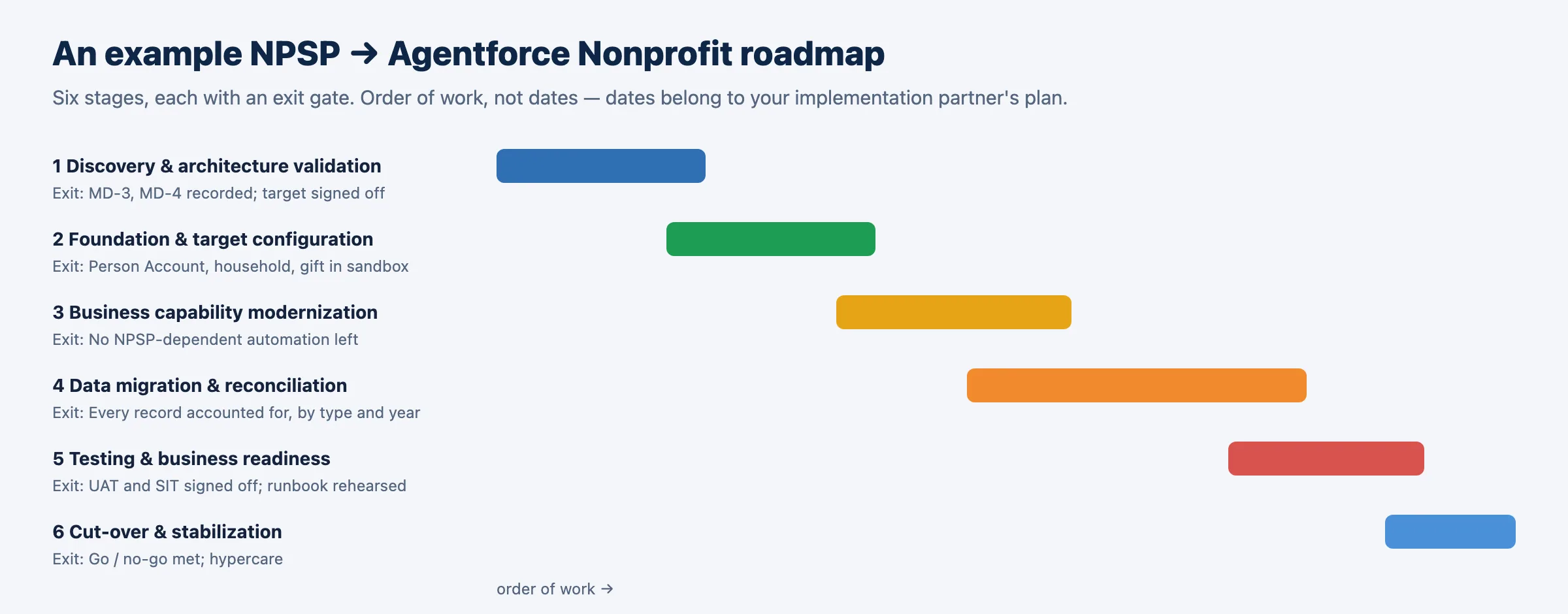
The six stages
Exit Gates| Stage | Needs | Exit — demonstrated by | Approver | Effort |
|---|---|---|---|---|
| 1 · Discovery & architecture validation | A read-only assessment of the NPSP org | Recurring collection and vendor confirmations recorded; the target design signed off by the sponsor | Executive sponsor, fundraising[3], finance, admin | M |
| 2 · Foundation & target configuration | Stage 1 exit; target-org and security decisions approved | In the trial sandbox a fundraiser can create a Person Account, a household and a gift with a designation and soft credit | Solution architect | M |
| 3 · Business capability modernization | Stage 2; vendor confirmations recorded | No NPSP-dependent automation left to rebuild — triggers, flows, rollups, reports and components rebuilt on the target objects | Solution architect, developer, admin, report owners | XL |
| 4 · Data migration & reconciliation | Stage 2; cleansing decisions; every in-scope mapping approved | Two trial loads reconcile: constituents, households, gifts by type and year, amounts by fund | Migration lead with data owners | XL |
| 5 · Testing & business readiness | Two reconciled trial loads; automation and reports rebuilt | UAT signed off by fundraising and finance; integration tests passed; cut-over runbook rehearsed | Fundraising lead, finance, test lead, trainers | L |
| 6 · Cut-over & stabilization | UAT, integration and security sign-offs; a rehearsed runbook | Go / no-go criteria all met; the production load reconciles; hypercare closes | Executive sponsor | M |
The order of work, by workstream
WorkstreamsInside the stages, the work runs blockers first, then evidence, then the mandatory decisions in dependency order: discovery → target architecture decisions → fundraising design → data quality → customization redesign → integrations → reporting → migration preparation. The delivery view breaks the same work into packages a delivery manager can assign — constituent transformation, household and relationship migration, fundraising migration, recurring-donation continuity, integration remediation, automation redesign, data cleansing, environments and release, security and licensing, systems integration testing, user acceptance and training, cut-over and contingency, hypercare and decommissioning — each with a readiness state, an outstanding approval and an accountable role.
Go / no-go: how you’ll know it’s done
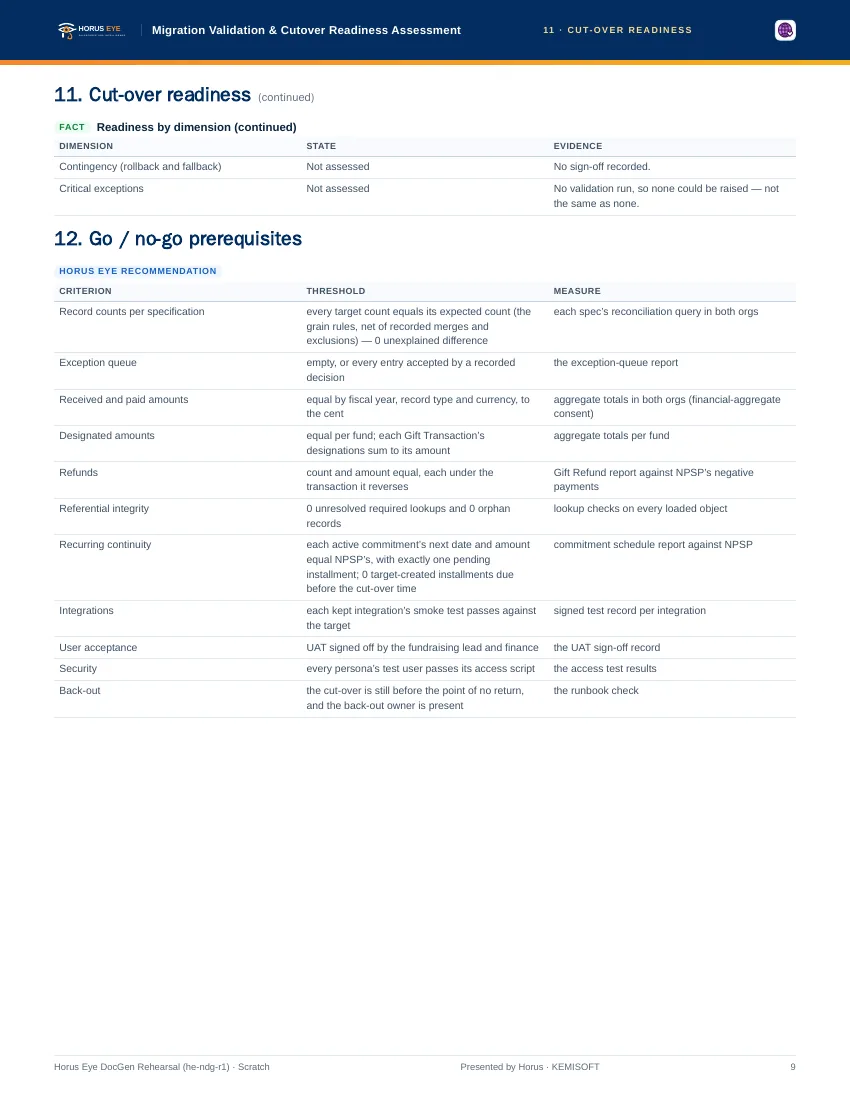
The Last GateAn NPSP migration roadmap earns trust at its last gate. “Migrated” is a measurable state. These are the criteria a cut-over should meet before the executive sponsor authorizes it — all of them, recorded, not remembered:
| Criterion | Threshold |
|---|---|
| Record counts | Every target count equals its expected count, with 0 unexplained difference |
| Exception queue | Empty, or every entry accepted by a recorded decision |
| Received and paid amounts | Equal by fiscal year, record type and currency, to the cent |
| Designated amounts | Equal per fund; each gift’s designations sum to its amount |
| Refunds | Count and amount equal, each under the transaction it reverses |
| Referential integrity | 0 unresolved required lookups and 0 orphan records |
| Recurring continuity | Each active commitment’s next date and amount equal NPSP’s, with exactly one pending installment |
| Integrations | Each kept integration’s smoke test passes against the target |
| User acceptance | UAT signed off by the fundraising lead and finance |
| Security | Every persona’s test user passes its access check |
Horus Eye’s validation compares your sandbox target with the source by count after each migration step, and the status shown is always the one on your org — whether and when to migrate remains your organization’s decision.
About the figures on this page: counts and percentages describe Horus Eye’s own test orgs, which hold seeded example data. They are examples of what an assessment reports — never typical results and never a benchmark for your org.
Sources & further reading
References- 1.
 Salesforce · Agentforce Nonprofit Migration Guide v2.0 (PDF) — The official guide this content follows: platform differences, migration recommendations, and how NPSP features map to Agentforce Nonprofit. ↩︎
- 2. Salesforce Help · Nonprofit Cloud Migration and Implementation Guides — Salesforce’s index of the migration, implementation, Fundraising and Program Management guides. ↩︎
- 3. Salesforce · Fundraising Implementation Guide (PDF) — How Fundraising is planned and configured in the target: processes, objects, gift entry, RFM scoring. ↩︎
“Salesforce”, “Agentforce” and related marks are the property of Salesforce, Inc. Horus Eye is an independent product and is not affiliated with, endorsed, or sponsored by Salesforce, Inc.
Protected AI — the Trust Layer
Every AI read in Horus Eye is metadata-first: built from an allowlist, sanitized by pattern, made through one audited gateway and checked by an output firewall on the way back — and AI is off by default, per org. Every request carries an audit id and an AI Data Scope manifest you can open.
Start your migration now
Horus EyeA read-only assessment places you on it with evidence: what is already decided, what blocks stage one, and the order of work for your org specifically.
Try Horus Eye Free Request an Assessment All Horus Eye pagesFree start · 250 credits for 60 days · no card required · scans are free