NPSP Migration Decisions · AD-8
Which record types does the target carry for people, accounts and gifts?
Nonprofit Cloud record types earn their place differently: in NPSP, record types often classify gifts — but after migration the gift objects themselves say what a record is: a transaction, a commitment, a refund. A record type that only classified duplicates what the target now states natively. Every record type kept is one more thing to secure, lay out and test.
Who decides
Solution architect with the fundraising[2] lead
Decide after
AD-3 (gift grain)
Estimated effort
S list the dependents, then choose
What answers it
The record types in use, and the reports, layouts and automation that select on them.
Your options, and what each one does
The Options| The option | What it means for the migration |
|---|---|
| Person Account, household and organization; gift record types only where processes differ | The grain rule already sorts gifts by what they are, so a record type is kept only where a page layout or a process genuinely differs. Fewer record types to secure and test. |
| NPSP’s record types carried over one for one | Opportunity record types recreated on the target objects[1], beside the target’s own sorting. Reports and layouts that use them move unchanged. |
What Horus Eye recommends — and when
Recommendation, Not VerdictKeep a record type only where a layout or process differs. What would change it: reports, layouts or automation that select on an NPSP record type and must keep working unchanged — then carrying them over is the cheaper rebuild. Nonprofit Cloud record types are easy to add later; start with the fewest the target needs.
A recommendation is a starting point, not a verdict. The same question lands differently org by org — one fact about your automation, volumes or vendors can flip the right answer. That is why the reasons are stated, and what would change them.
How this decision plays out
In PracticeIn NPSP, record types often exist to say what a record is — this Opportunity is a grant, that one is a membership. After migration, the objects themselves say that: a transaction, a commitment, a refund are different objects, not different labels on one. A record type carried over just to classify now duplicates what the data model states natively — and it is not free. Every record type kept is another layout to maintain, another branch in the security model to test, another value for reports to filter. The lean default — Person Account, household and organization accounts, with gift record types only where a page layout or business process genuinely differs — keeps the target org explainable.
The legitimate counter-case is installed-base gravity: reports, layouts and automation that select on a specific NPSP record type and must keep working unchanged. Carrying those types over one-for-one is sometimes the cheaper rebuild — but make that choice by listing the actual dependents, not by habit. A useful test for each candidate type: if it disappeared tomorrow, what specifically would break, and who would notice? A type with a concrete answer earns its place; a type whose defense is “we have always had it” is classification nostalgia, and the migration is the moment to let it go.
Questions to settle before you record an answer
Before You Decide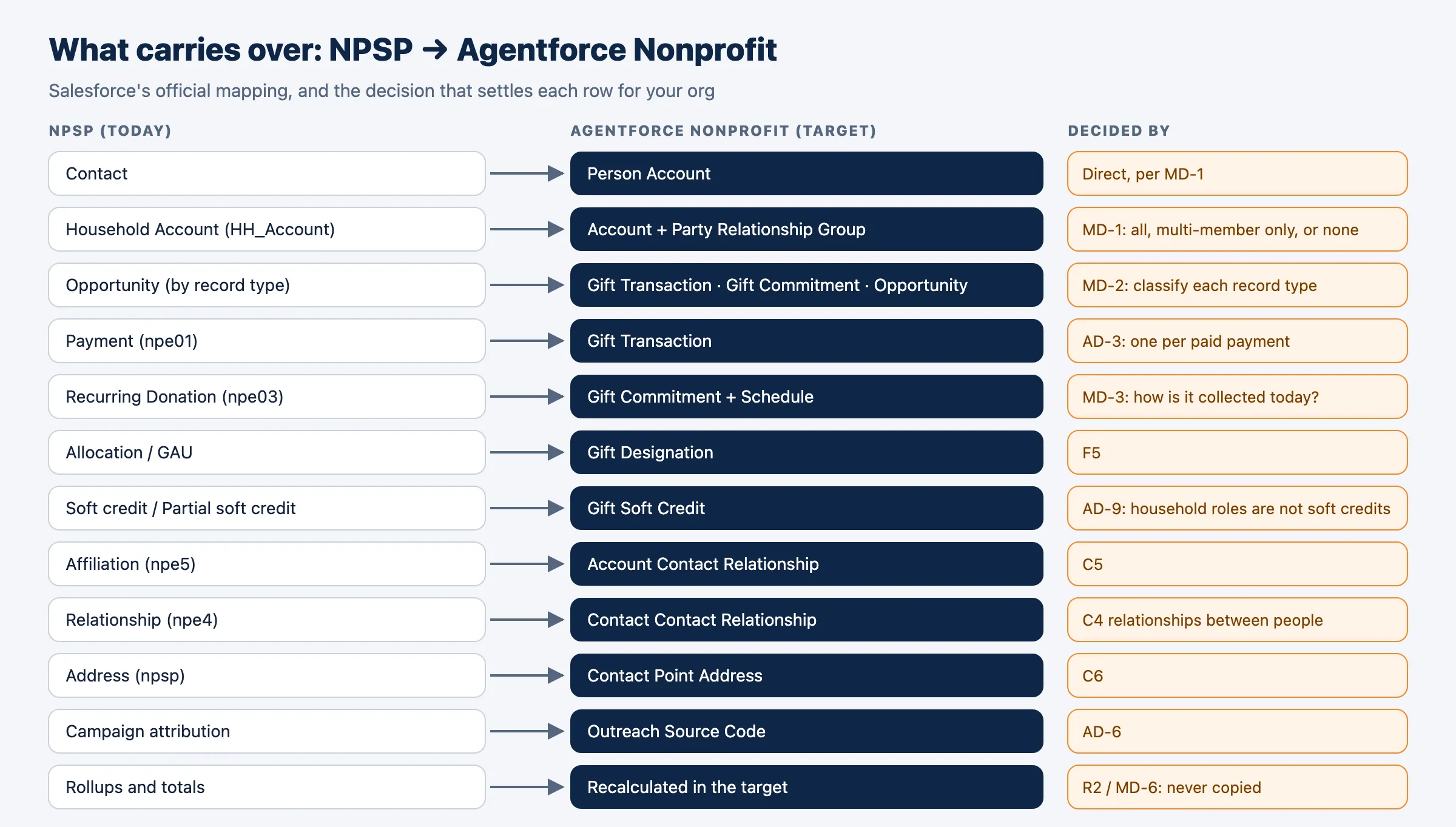
How Horus Eye helps
With Horus EyeWhen Horus Eye assesses an NPSP org, this question is raised with the evidence the scan saw — the record types, fields and settings behind it — its recommendation marked, and the reasons stated. Accept records the recommendation; Change opens the options. Recording an answer writes nothing to Salesforce: it is captured in the decision register, with who decided and when, and the migration plan, mappings and documents are kept consistent with what your organization actually decided. Horus Eye recommends; your organization decides.
Related decisions
Keep Planning- AD-3 · Gift record grain — Which source record becomes the Gift Transaction: the gift, its payment, or both?
- AD-4 · Security & licensing — Who sees and changes which records in the target — and with which licenses?
- AD-7 · Duplicates during the load — Do duplicate and matching rules run while the migration loads?
- All sixteen decisions →
Sources & further reading
References- 1.
 Salesforce Help · Nonprofit Cloud Data Model Objects — The target objects, as Salesforce documents them. ↩︎
- 2. Salesforce · Fundraising Implementation Guide (PDF) — How Fundraising is planned and configured in the target: processes, objects, gift entry, RFM scoring. ↩︎
“Salesforce”, “Agentforce” and related marks are the property of Salesforce, Inc. Horus Eye is an independent product and is not affiliated with, endorsed, or sponsored by Salesforce, Inc.
Protected AI — the Trust Layer
Every AI read in Horus Eye is metadata-first: built from an allowlist, sanitized by pattern, made through one audited gateway and checked by an output firewall on the way back — and AI is off by default, per org. Every request carries an audit id and an AI Data Scope manifest you can open.
Facing this decision in your own org?
Horus EyeA read-only assessment puts the evidence behind it on the table — what your org holds, what it means for this choice, and the decisions that depend on it.
Try Horus Eye Free Request an Assessment All Horus Eye pagesFree start · 250 credits for 60 days · no card required · scans are free