NPSP Migration Decisions · MD-5
Where does the information in fields without a direct target go?
NPSP field mapping has a blind spot: Salesforce’s workbook has no row for an org’s own custom fields, and a substantial share of NPSP’s fields have no direct target — on the workbook Horus Eye encodes, fewer than half of the field rows map one-for-one. “Disregard” in the workbook does not mean “delete”; it means Salesforce does not carry it, so you decide where that information goes.[2]
Who decides
Salesforce administrator with the data owners
Decide after
MD-1 (household model)
Estimated effort
XL hundreds of fields, one approved workbook
What answers it
The org’s custom fields on Contact, Account and the NPSP objects; NPSP fields not carried over as they are, and the components that read them.
Your options, and what each one does
The Options| The option | What it means for the migration |
|---|---|
| Give each field a target | Each kept field maps to a target field, a contact-point record, or a transformation — created on the target object where nothing suitable exists. |
| Archive what is not used | Unused information is archived outside the live model, not migrated — confirm actual usage first, because a field nobody can name an owner for is usually read by a report somebody loves. |
What Horus Eye recommends — and when
Recommendation, Not VerdictTreat every field without a target as a decision with three honest outcomes: keep it (create or map a destination), move its information elsewhere, or archive it. The mapping workbook[1] that documents source field, destination and transformation choice is the artifact your architect and your auditors will both want. NPSP field mapping is decided once, here — then simply executed in the load.
A recommendation is a starting point, not a verdict. The same question lands differently org by org — one fact about your automation, volumes or vendors can flip the right answer. That is why the reasons are stated, and what would change them.
How this decision plays out
In PracticeThe scale of this one surprises teams. On the version of Salesforce’s mapping workbook that Horus Eye encodes (29 May 2026), fewer than half of the field rows map one-for-one; hundreds are marked Disregard or Omit, meaning Salesforce does not carry them — and your org’s own custom fields are not in the workbook at all. “Disregard” is easy to misread as “delete”; it actually means the decision is yours. Some of that information belongs on the target as a new field, some belongs in a different shape (a contact-point record, a transformed value), some belongs in an archive, and some genuinely belongs nowhere — but each of those is a recorded choice with an owner, not a default.
The practical discipline is a mapping workbook: source field, destination, transformation, decision, owner — approved before any load is built, because unapproved mappings discovered mid-load are how migrations slip by quarters. Beware the field nobody can name an owner for: it is usually read by a report somebody loves. Usage evidence beats recollection here; check what reports, automation and page layouts actually reference a field before deciding its fate.
Questions to settle before you record an answer
Before You Decide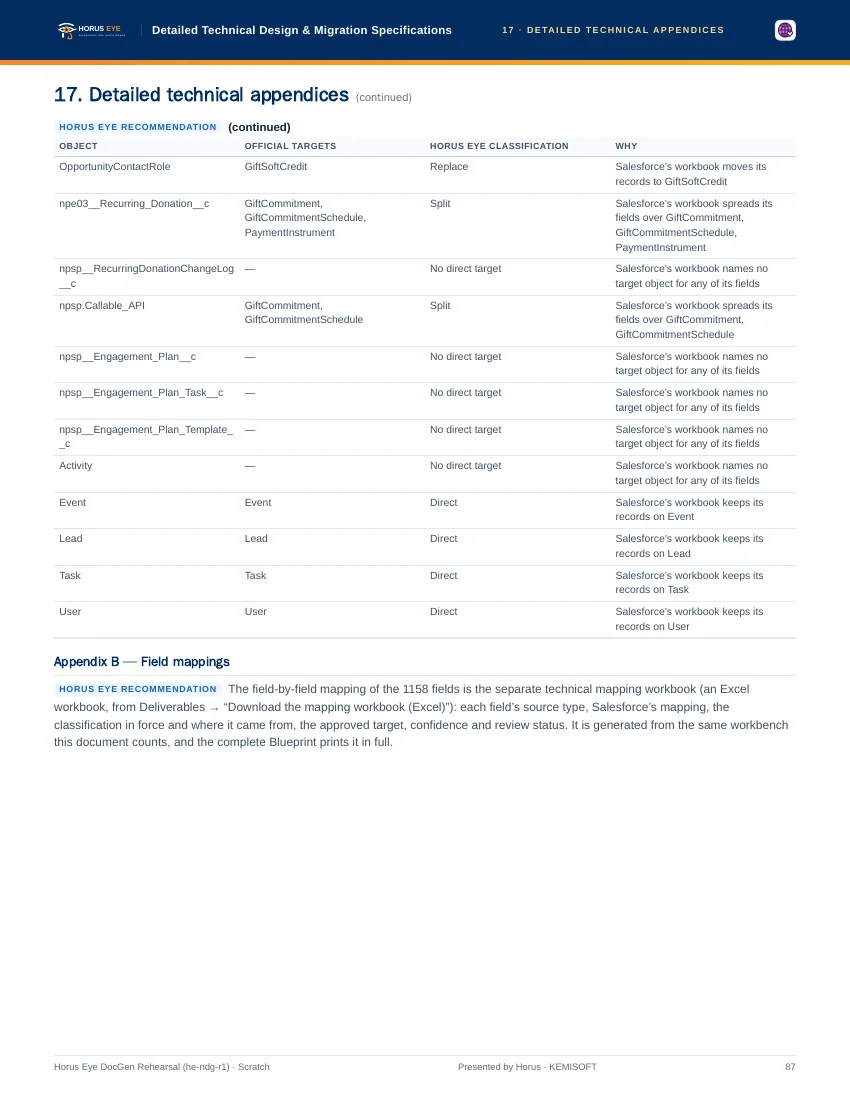
How Horus Eye helps
With Horus EyeWhen Horus Eye assesses an NPSP org, this question is raised with the evidence the scan saw — the record types, fields and settings behind it — its recommendation marked, and the reasons stated. Accept records the recommendation; Change opens the options. Recording an answer writes nothing to Salesforce: it is captured in the decision register, with who decided and when, and the migration plan, mappings and documents are kept consistent with what your organization actually decided. Horus Eye recommends; your organization decides.
Sources & further reading
References- 1.
 Salesforce · Agentforce Nonprofit Migration Guide v2.0 (PDF) — The official guide this content follows: platform differences, migration recommendations, and how NPSP features map to Agentforce Nonprofit. ↩︎
- 2. Salesforce Help · Nonprofit Cloud Data Model Objects — The target objects, as Salesforce documents them. ↩︎
“Salesforce”, “Agentforce” and related marks are the property of Salesforce, Inc. Horus Eye is an independent product and is not affiliated with, endorsed, or sponsored by Salesforce, Inc.
Protected AI — the Trust Layer
Every AI read in Horus Eye is metadata-first: built from an allowlist, sanitized by pattern, made through one audited gateway and checked by an output firewall on the way back — and AI is off by default, per org. Every request carries an audit id and an AI Data Scope manifest you can open.
Facing this decision in your own org?
Horus EyeA read-only assessment puts the evidence behind it on the table — what your org holds, what it means for this choice, and the decisions that depend on it.
Try Horus Eye Free Request an Assessment All Horus Eye pagesFree start · 250 credits for 60 days · no card required · scans are free