NPSP Migration Decisions · MD-3
How are recurring donations collected today, and how will their schedules continue after migration?
In an NPSP recurring donations migration, every recurring gift becomes a Gift Commitment[2] with a Gift Commitment Schedule. Whether giving continues without a gap depends on how each one is collected: a payment processor’s schedules and stored payment methods need the vendor’s confirmed support, while staff-recorded payments, bank transfers, cheques and offline pledges need only their schedules recreated and the team’s process kept. This is the decision that protects recurring revenue.[1]
Who decides
Fundraising[3] operations lead, with the payment vendor where one collects the gifts
Decide after
MD-2 (gift classification)
Estimated effort
L vendor confirmations drive the timeline
What answers it
Payment-processor packages and their links to recurring gifts; with counts-only profiling, how many recurring donations are active and the payment methods recorded on them (counts per method only). How a payment is actually taken is the administrator’s answer.
Your options, and what each one does
The Options| The option | What it means for the migration |
|---|---|
| An automated payment processor or payment integration | Its schedules and stored payment methods must move to Gift Commitments with the vendor’s support (see MD-4); a processor confirmed incompatible with no approved transition blocks the migration until it is resolved. |
| Payments recorded by staff as they arrive | Gift Commitment schedules give the expected gifts; staff keep recording each payment as a Gift Transaction. No integration to move. |
| Bank transfers or direct debits | The bank holds the mandates; schedules become Gift Commitments and the bank reconciliation is re-pointed to Gift Transactions — keep each mandate reference. |
| Cheques | Schedules become Gift Commitments as expected gifts; each cheque is recorded as a Gift Transaction when it arrives. |
| Offline pledges — nothing is collected automatically | Pledges become Gift Commitments with schedules; nothing is charged, so continuity is the reminder process. |
| A mix of these methods | Each method gets its own plan; any automated part needs the vendor’s confirmation. |
What Horus Eye recommends — and when
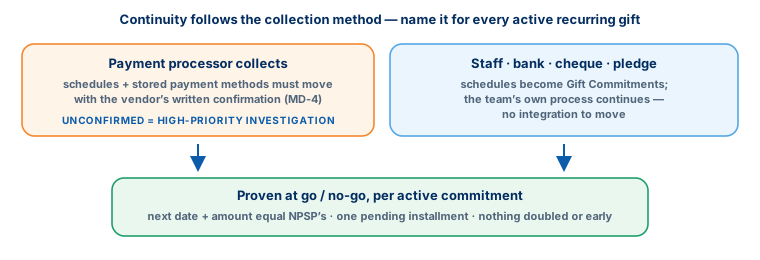
Recommendation, Not VerdictThere is no default here — the answer is yours, and it needs evidence. Name the collection method for every active recurring donation, and get each vendor’s answer in writing. Until a processor’s compatibility is confirmed, treat it as a high-priority investigation, not a footnote. At cut-over, continuity is proven, not assumed: each active commitment’s next date and amount should match NPSP’s, with exactly one pending installment. In an NPSP recurring donations migration, continuity is the one promise donors actually notice.
A recommendation is a starting point, not a verdict. The same question lands differently org by org — one fact about your automation, volumes or vendors can flip the right answer. That is why the reasons are stated, and what would change them.
How this decision plays out
In PracticeThis is the decision with the sharpest operational edge, because it touches money that arrives on a schedule. The failure modes are mirror images: a processor’s schedule that does not survive migration means recurring gifts quietly stop; a schedule migrated carelessly beside a still-active processor means donors are charged twice. Both are reputational events, not just data defects — which is why the collection method has to be named for every active recurring donation, not assumed from the majority case. Staff-recorded, bank-collected, cheque and pledge-based giving are all straightforward: recreate the schedule, keep the team’s process. The processor case is the one that needs a letter, not a hunch: the vendor’s written confirmation that stored payment methods and schedules move, or a transition plan with dates.
The go / no-go criterion that protects you at cut-over is concrete: every active commitment’s next expected date and amount in the new org equals NPSP’s, with exactly one pending installment — nothing missing, nothing duplicated, nothing created early. Plan for someone to watch the first full collection cycle after go-live; that is when theory meets the bank statement.
Questions to settle before you record an answer
Before You Decide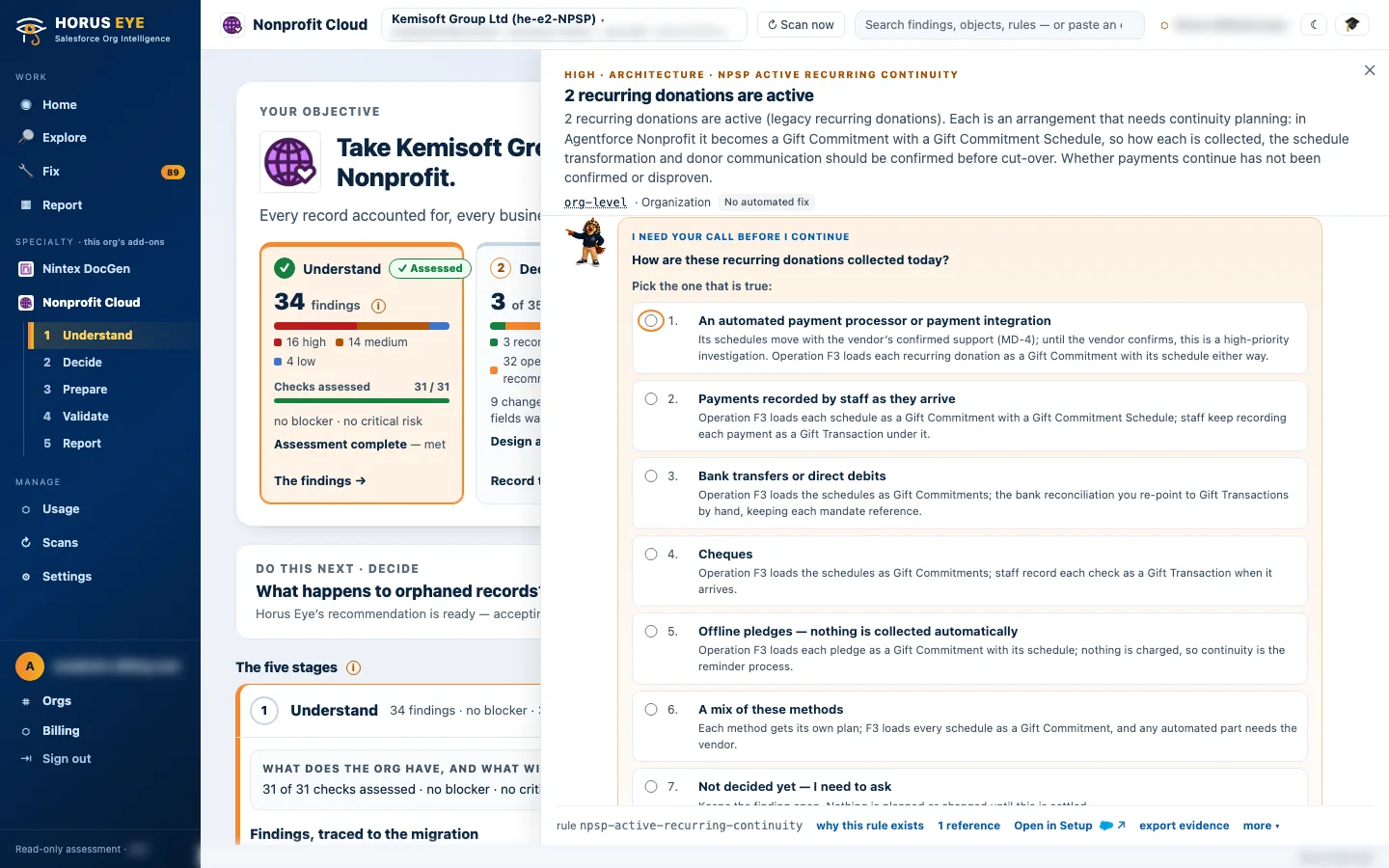
How Horus Eye helps
With Horus EyeWhen Horus Eye assesses an NPSP org, this question is raised with the evidence the scan saw — the record types, fields and settings behind it — its recommendation marked, and the reasons stated. Accept records the recommendation; Change opens the options. Recording an answer writes nothing to Salesforce: it is captured in the decision register, with who decided and when, and the migration plan, mappings and documents are kept consistent with what your organization actually decided. Horus Eye recommends; your organization decides.
Related decisions
Keep Planning- AD-2 · Legacy recurring path — Legacy Recurring Donations: upgrade to Enhanced in NPSP first, or transform the legacy structures directly?
- MD-4 · Packages & integrations — Which installed packages and integrations must work with Agentforce Nonprofit — and has each vendor confirmed it?
- All sixteen decisions →
Sources & further reading
References- 1.
 Salesforce · Agentforce Nonprofit Migration Guide v2.0 (PDF) — The official guide this content follows: platform differences, migration recommendations, and how NPSP features map to Agentforce Nonprofit. ↩︎
- 2. Salesforce Help · Gift Commitments — How recurring giving and pledges live in the target. ↩︎
- 3. Salesforce · Fundraising Implementation Guide (PDF) — How Fundraising is planned and configured in the target: processes, objects, gift entry, RFM scoring. ↩︎
“Salesforce”, “Agentforce” and related marks are the property of Salesforce, Inc. Horus Eye is an independent product and is not affiliated with, endorsed, or sponsored by Salesforce, Inc.
Protected AI — the Trust Layer
Every AI read in Horus Eye is metadata-first: built from an allowlist, sanitized by pattern, made through one audited gateway and checked by an output firewall on the way back — and AI is off by default, per org. Every request carries an audit id and an AI Data Scope manifest you can open.
Facing this decision in your own org?
Horus EyeA read-only assessment puts the evidence behind it on the table — what your org holds, what it means for this choice, and the decisions that depend on it.
Try Horus Eye Free Request an Assessment All Horus Eye pagesFree start · 250 credits for 60 days · no card required · scans are free