NPSP Migration Decisions · AD-1
A new Agentforce Nonprofit org, or transform NPSP in place?
The NPSP migration new-org question turns on a one-way door: Salesforce does not allow Person Accounts[2] to be disabled once enabled. Migrating in place means taking that irreversible step in your live NPSP org; migrating to a new org takes it in a clean org and keeps NPSP untouched as your back-out until the point of no return. This is the decision to make first, before anyone provisions anything.[3]
Who decides
Executive sponsor with the Salesforce account team and the solution architect
Decide after
Nothing — decide this first
Estimated effort
S small effort, biggest consequence — decide first
What answers it
Integrations keyed to the org’s id, the license position, data volumes against the cut-over window, and any regulatory or contractual requirement to keep the same org.
Your options, and what each one does
The Options| The option | What it means for the migration |
|---|---|
| A new Agentforce Nonprofit org | NPSP stays unchanged and becomes read-only at cut-over, so back-out before the point of no return is re-opening entry in NPSP. Person Accounts are enabled once, in the new org, before configuration. Users, permission sets, licenses and every kept integration are set up again against the new org; history moves by load. A license for the new org is needed, and the NPSP org stays licensed for its read-only period. |
| In place, in the existing NPSP org | Person Accounts are enabled in the live NPSP org — irreversible. NPSP and the target objects coexist during the transition, and NPSP is uninstalled afterwards. Integrations keep the same org but are re-pointed. Back-out is limited: the org itself has changed. |
What Horus Eye recommends — and when
Recommendation, Not VerdictA new org, in most profiles — Salesforce itself frames the move from NPSP as a reimplementation into a new org, and a new org is what makes back-out real. What would change the answer: integrations keyed to this org’s id that cannot be re-created, a license position that makes a second org impractical, volumes that cannot load within the cut-over window, or a contractual requirement to keep the org. Verify the framing against the current  Migration Guide[1] — it is worth reading §2.2 yourself. For most teams the NPSP migration new-org question settles itself once Person Accounts are understood.
A recommendation is a starting point, not a verdict. The same question lands differently org by org — one fact about your automation, volumes or vendors can flip the right answer. That is why the reasons are stated, and what would change them.
How this decision plays out
In PracticeEvery other decision can be revisited; this one cannot, which is why it comes first. Person Accounts, once enabled in an org, cannot be disabled — Salesforce is explicit about it. Migrate in place and you take that irreversible step inside the org your fundraisers are using today; migrate to a new org and you take it in a clean room while NPSP keeps running untouched. That difference is what makes back-out real: with a new org, the worst day before the point of no return ends with “re-open entry in NPSP and regroup”; in place, the org itself has already changed under you.
The new-org path has honest costs, and naming them builds trust with whoever signs the license agreement: a second org to license during the transition, NPSP kept licensed and read-only for an agreed period after go-live, and users, permission sets and every kept integration set up fresh against the new org. The in-place path trades those costs for concentrated risk. What genuinely flips the answer is rare but real: an external system keyed to the org’s ID that cannot be re-pointed, a licensing position that makes two orgs untenable, data volumes that cannot load inside the cut-over window, or a contract that names the org. Check for all four before defaulting to either path.
Questions to settle before you record an answer
Before You Decide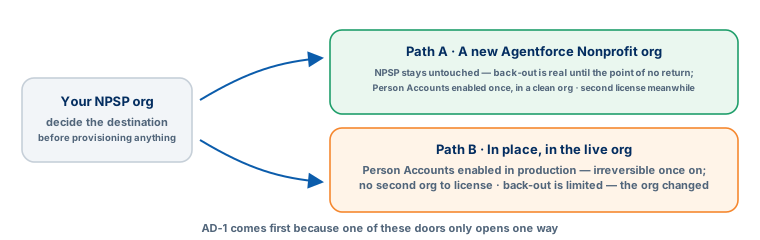
How Horus Eye helps
With Horus EyeWhen Horus Eye assesses an NPSP org, this question is raised with the evidence the scan saw — the record types, fields and settings behind it — its recommendation marked, and the reasons stated. Accept records the recommendation; Change opens the options. Recording an answer writes nothing to Salesforce: it is captured in the decision register, with who decided and when, and the migration plan, mappings and documents are kept consistent with what your organization actually decided. Horus Eye recommends; your organization decides.
Related decisions
Keep Planning- MD-1 · Household model — How will households be represented in Agentforce Nonprofit?
- MD-4 · Packages & integrations — Which installed packages and integrations must work with Agentforce Nonprofit — and has each vendor confirmed it?
- AD-4 · Security & licensing — Who sees and changes which records in the target — and with which licenses?
- AD-5 · Data scope & archive — Which records outside the core migration move — and where does the rest go?
- All sixteen decisions →
Sources & further reading
References- 1. Salesforce · Agentforce Nonprofit Migration Guide v2.0 (PDF) — The official guide this content follows: platform differences, migration recommendations, and how NPSP features map to Agentforce Nonprofit. ↩︎
- 2. Salesforce Help · Enable Person Accounts for Fundraising — The enablement step — and why it is planned, not casual: Person Accounts cannot be disabled once enabled. ↩︎
- 3. Salesforce Help · Nonprofit Cloud Migration and Implementation Guides — Salesforce’s index of the migration, implementation, Fundraising and Program Management guides. ↩︎
“Salesforce”, “Agentforce” and related marks are the property of Salesforce, Inc. Horus Eye is an independent product and is not affiliated with, endorsed, or sponsored by Salesforce, Inc.
Protected AI — the Trust Layer
Every AI read in Horus Eye is metadata-first: built from an allowlist, sanitized by pattern, made through one audited gateway and checked by an output firewall on the way back — and AI is off by default, per org. Every request carries an audit id and an AI Data Scope manifest you can open.
Facing this decision in your own org?
Horus EyeA read-only assessment puts the evidence behind it on the table — what your org holds, what it means for this choice, and the decisions that depend on it.
Try Horus Eye Free Request an Assessment All Horus Eye pagesFree start · 250 credits for 60 days · no card required · scans are free