NPSP Migration Decisions · AD-2
Legacy Recurring Donations: upgrade to Enhanced in NPSP first, or transform the legacy structures directly?
Salesforce’s mapping[1] workbook is written for Enhanced Recurring Donations. If your donations are still in legacy mode, there are two honest paths — and the right one usually turns on a single fact: whether any of your automation reads the recurring schedule fields. If none does, upgrading in NPSP changes little and lets the workbook apply as written. If automation does read them, upgrading would change those automations just before they are rebuilt on the target anyway.[2]
Who decides
Fundraising operations lead with the solution architect
Decide after
MD-3 (recurring collection)
Estimated effort
M a sandbox upgrade test decides it
What answers it
The recurring-donation mode (legacy or Enhanced), and which triggers, flows or rollups read the schedule fields.
Your options, and what each one does
The Options| The option | What it means for the migration |
|---|---|
| Upgrade to Enhanced Recurring Donations in NPSP before the extract | Salesforce’s mapping then applies as written. NPSP’s own recurring behaviour changes before the move, so automation on recurring fields must be re-tested in NPSP first — an extra change in the live org, ahead of the migration. |
| Transform the legacy structures directly | NPSP is not changed before the move. Status, amount per installment and period are derived from the legacy fields the workbook disregards. The transform and its tests are additional migration design, bounded and testable on the trial loads. |
What Horus Eye recommends — and when
Recommendation, Not VerdictWhen donations are already Enhanced, there is no fork: map them as the workbook does. When they are legacy, check whether the Enhanced upgrade completes cleanly in a sandbox copy, and let the automation question decide — no automation on the schedule fields favours upgrading first; live automation on them favours the direct transform.
A recommendation is a starting point, not a verdict. The same question lands differently org by org — one fact about your automation, volumes or vendors can flip the right answer. That is why the reasons are stated, and what would change them.
How this decision plays out
In PracticeWhat makes this decision satisfying is that it usually turns on a single checkable fact: does any of your automation read the recurring-donation schedule fields? Salesforce’s mapping workbook is written for Enhanced Recurring Donations. If your donations are legacy and nothing reads the schedule fields, upgrading to Enhanced inside NPSP first changes little in daily operation — and afterwards the workbook applies exactly as written, with no bespoke transformation logic for anyone to maintain. If automation does read those fields, the upgrade would change live behaviour weeks before that same automation gets rebuilt on the target anyway — two disruptions where one would do — and transforming the legacy structures directly becomes the calmer path.
Neither path should be chosen on paper alone. The upgrade case earns its keep in a sandbox first: run NPSP’s Enhanced upgrade on a copy, confirm it completes cleanly, and re-test anything that touches recurring giving. The transform case is additional migration design — bounded, testable on trial loads, but yours to verify rather than Salesforce’s. And if your donations are already Enhanced, enjoy the rare migration decision with one option: map them as the workbook does.
Questions to settle before you record an answer
Before You Decide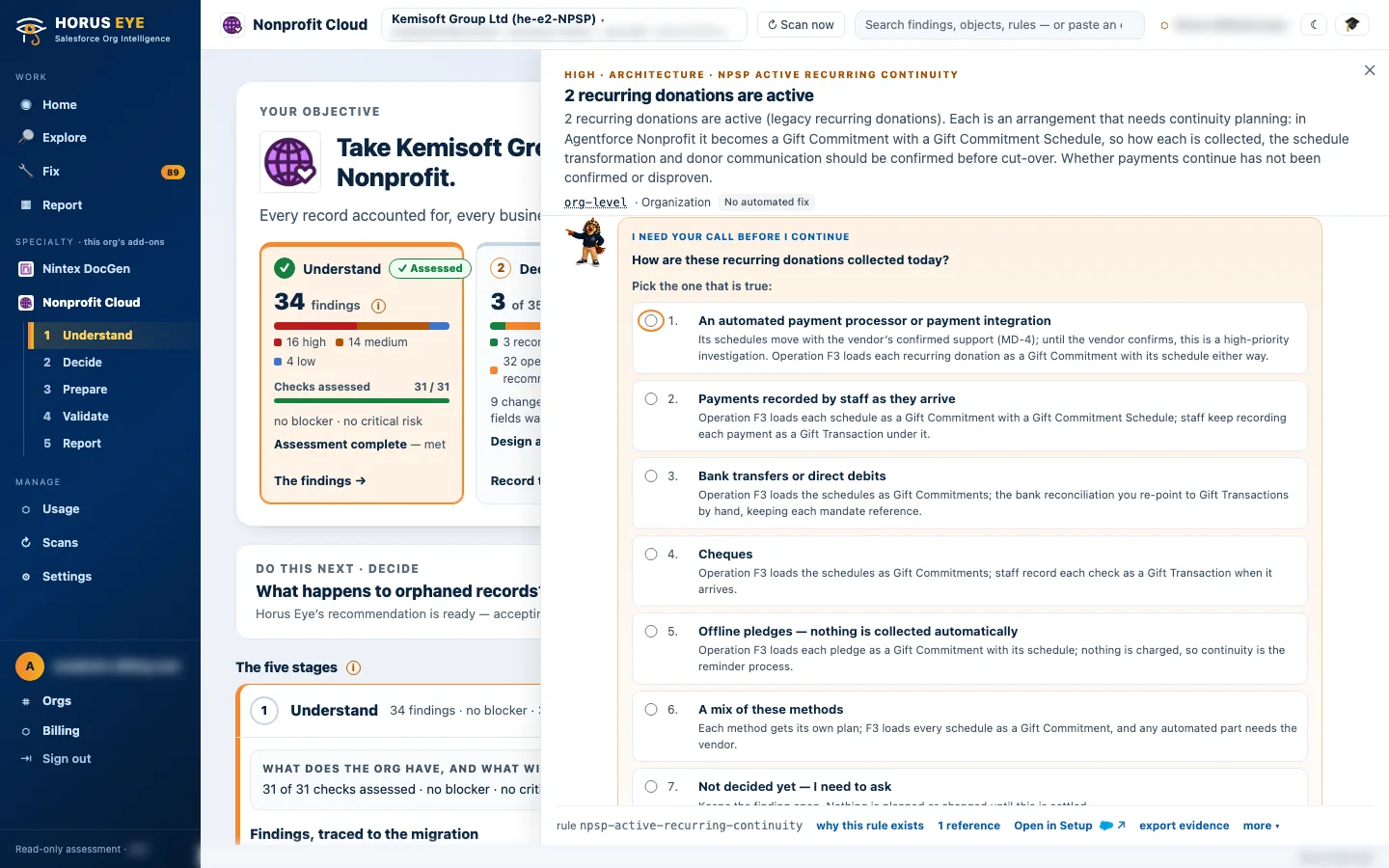
How Horus Eye helps
With Horus EyeWhen Horus Eye assesses an NPSP org, this question is raised with the evidence the scan saw — the record types, fields and settings behind it — its recommendation marked, and the reasons stated. Accept records the recommendation; Change opens the options. Recording an answer writes nothing to Salesforce: it is captured in the decision register, with who decided and when, and the migration plan, mappings and documents are kept consistent with what your organization actually decided. Horus Eye recommends; your organization decides.
Related decisions
Keep PlanningSources & further reading
References- 1.
 Salesforce · Agentforce Nonprofit Migration Guide v2.0 (PDF) — The official guide this content follows: platform differences, migration recommendations, and how NPSP features map to Agentforce Nonprofit. ↩︎
- 2. Salesforce Help · Gift Commitments — How recurring giving and pledges live in the target. ↩︎
“Salesforce”, “Agentforce” and related marks are the property of Salesforce, Inc. Horus Eye is an independent product and is not affiliated with, endorsed, or sponsored by Salesforce, Inc.
Protected AI — the Trust Layer
Every AI read in Horus Eye is metadata-first: built from an allowlist, sanitized by pattern, made through one audited gateway and checked by an output firewall on the way back — and AI is off by default, per org. Every request carries an audit id and an AI Data Scope manifest you can open.
Facing this decision in your own org?
Horus EyeA read-only assessment puts the evidence behind it on the table — what your org holds, what it means for this choice, and the decisions that depend on it.
Try Horus Eye Free Request an Assessment All Horus Eye pagesFree start · 250 credits for 60 days · no card required · scans are free